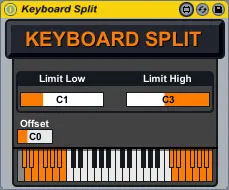
Keyboard Split
A simple device that allows to pass notes only in the select...
- Type
- MIDI Effect
- Author
- dasfaker
- Version
- 1.0
- License
- AttributionNonCommercial
- Live version
- 8.2.2
- Max version
- 5.1.8
- Downloads
- 1,187
- Updated
- No Updates
Keyboard Split is a MIDI Effect for Ableton Live by dasfaker, distributed as Creative Commons Attribution-NonCommercial. It targets Live 8.2.2 and Max 5.1.8. On maxforlive.com it has 1,187 downloads. Published 2011-05-11. 4 user comments below.
New to Max for Live? Read what MIDI Effects do, what the AttributionNonCommercial license means, how to install a device.
Description
A simple device that allows to pass notes only in the selected range.
Useful if you want to play several midi tracks from one keyboard, similar to a hardware synth split keyboard function.
Comments (4)
But would it be possible to save the edited range with the live set? I have to re-edit that every time I load my live set and I got the plugin on several tracks...
Thanks!
I just needed to add an "pattrstorage" and a "autopattr" to the patch and the restoring worked out of the box.
See this article:
https://cycling74.com/2011/05/19/max-for-live-tutorial-adding-pattr-presets-to-your-live-session/
It's seems to be for an older version of max-for-live, though.
Cheers, Clemens