- Type
- MIDI Effect
- Author
- synnack
- Version
- 1.6
- License
- Attribution
- Live version
- 8.3
- Max version
- 5.1.8
- Downloads
- 16,344
- Updated
- 2016-09-05
LineFO is a MIDI Effect for Ableton Live by synnack, distributed as Creative Commons Attribution. It targets Live 8.3 and Max 5.1.8. On maxforlive.com it has 16,344 downloads. First published 2009-11-09, last updated 2016-09-05. 59 user comments below.
New to Max for Live? Read what MIDI Effects do, what the Attribution license means, how to install a device.
Description
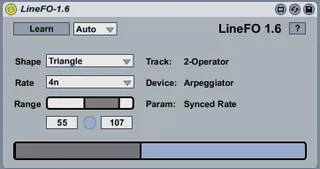
This device is a simulated LFO you can used to modulate device parameters. It's simulated in that it doesn't actually use an oscillator at all but the Max line object to simulate shapes an LFO might generate. I built it to see if using this method would have a much lower performance impact than using actual oscillators.
I sometimes have 10+ things being modulated by an LFO at once in some of my work and using actual LFOs for that starts to have a serious impact. Using [line] should minimize performance impact yet still give basic ability to modulate things.
For extra credit, use LineFO to modulate the ranges of other instances of LineFO.
Usage:
*Add LineFO to a midi track
*Click "Learn"....
*Browse to any track and click on a parameter you want it to control
*Select the "shape"
*Optionally, set speed and range
New in 1.6
(*) LineFO now displays what device and parameter it is modulating (saved with Live set too)
(*) More accurate timing (found bug in API and created workaround)
(*) Fixed bug in max range control
(*) Lots of other code cleanup and more detailed help screen
Comments (59)
The target parameter menu does not populate on bang ...
Sorry for the noise ,)
http://forum.ableton.com/viewtopic.php?f=35&t=130118&p=1026939#p1026939
Please let me know if it randomly breaks again.
works, but I can see the shape selection issue.
I've modified the device a little so that the shape is remembered and works without touching, by using
a live.menu.
Where do I send it (don't want to upload, it's your work)?
Just send me a PM in the ableton forum.
Now... just need to get that second list populated in winXP, lol.
I am getting a parameter mismatch in the translation, as if maybe the recieving control is getting a 0-1 when it wants 0-127.
Thanks again, it got me going on something I've wanted to do for years.
can you post the solved one, for XP use?
thanks
See this thread:
http://forum.ableton.com/viewtopic.php?f=35&t=130118&sid=846d6853dce1381283135abb2cb6bdf8&start=15
@LLF, if you made a tweak you think everyone could use please send it to me and I'll update this device and credit you. [email protected]
For me, all I need to do to get it working is open the patch - once only. After that, oddly enough, live seems to recall the routing correctly (i.e. when reloading the set).
I started another project from scratch using parameter.remore and the problem is the same, so I can only assume its a bug.
At least you're good once you get a set going with it :)
On Operator or Analog it works as expected. This is really cool device, any ideas on how to get it working with Racks Macro Knobs??
request?? it doesn't see devices on a Send, I could use that.
very cool project though, most needed. Dummy Clips were a great invention, this could be better. :D
Actually I am getting very weirds behaviour. When I first instantiate the plug in Live it will populate the second menu but with the wrong data. Thereafter it will not change that data regardless of content of first menu. also the second menu items are not the gui names but the live.button/live.numbox codes etc.
When I use the device 'locked' in the patcher window it works fine.
Would be so cool to get this fixed....I am new to Max and M4L so my chances are slim....
I was trying to Modify this device where there were 8 knobs that could remote 8 knobs as in a Macro. Now I can't even get the original LineLFO to work.
I did however get it to modulate racks macro knobs connecting a patchcord from the knob directly to the M4L.api.DeviceParameterRemote, but still leaving everthing else as is. Not sure why that works but it did for me.
I love this thing. Now if I can only make 8 of them in one device, and it work.
Here are two bugs i've found during testing the device:
1. for some parameters the maximum modulation range (0-127 in the LinFO) does not match with the available range of the modulated parameter. for axample: the parameters of "auto filter" (attack, decay, frequency, etc.)
2. It seems to be no problem to move a device with a modulated parameter to different locations, but if you save your live project and open it again a parameter from a different device is being modulated, which has the same live path as the one from the beginning. clear ?
had a small issue with updating the modmax value through the numberbox, it didn't update the modamp boundaries..
Well, I just inserted a bang in between modmax value boxes, so now it updates both min and max through the numberboxes :p
crude, and stutters when adjusting the modmax numberbox val, but works for me!
Thanks again.. a very techno device, this one :D
only things I'm missing are a SINE wave and it would be nice to have 3, 1.5, 1/3, 1/6, 1/12, 1/24, rates.
If you connect your "scale" object to the middle input of the M4L.api.DeviceParameterRemote object, it works.
http://gyazo.com/0d9868c7150b106c9c0efa4a8cce9dab.png
I'm not quite sure why this is but it worked for me. Hope that helps.
awesome work, but i'd second the idea of a sine and maybe longer cycles 8, 16, 32 bars
But still incredibly useful.
keep up the good work
What version of Max? What version of Live? What OS?
What errors do you see in the Max window if any?
What specifically happens when you try to map it to something? (i.e. what does 'don't work' mean)
When I click on 'Learn' the text changes to 'Learning...', but when I click on a parameter I want to LFO, nothing happens - the text stays as 'Learning...' and the parameter is selected as if I didn't have the LineFO open at all.
In the max window it says "live.path - set path: invalid path" and "live.object - get: no valid object set".
Something to do with needing to upgrade max?
But before we go changing it, trying 8.3. and 5.1.9 is a good start. Even support would have you do that.
You can get Max 5.1.9 here http://cycling74.com/downloads/older/
For example, I have an instance of LineFO controlling the filter cutoff of Operator, but the filter does not appear to be "moving" in the rendered file.
I also noticed some instances of LineFO in the same file that were not working when I pressed play, and they only began working again after I saved the file.
Any help to remedy these issues would be appreciated. It's a great little device!
Thanks!
JR
Thanks so much for even replying.
JR
Maybe I had an old version. Thank you sir.
JR
Great device, but unfortunately its settings are not stored within a live set. When I reopen the set th settings are back to standard, so the device parameters are not stored. Any help?
Thanks and greetings!
To make it perfect I've added support for a sine-wave shape - if you'd like I can send you the modified device so you can share with others.
Thanks!
Insanity
(Holding out for 9.7 before I update again)
Confirmed that the previous version of LineFO 1.6 still drags in from the OS and Ableton Browser as expected.
Is anyone having the same issue?
Thanks for your time in advance!
https://forms.gle/VVPHqm6Aoz6bVZVk9