a better search for max devices
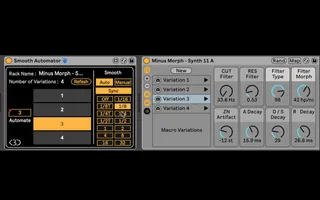
Smooth Automator screenshot

Smooth Automator

by KBDevices

Allows to create automations and morphing for Live 11's Var...

View on maxforlive.com Website

Type
MIDI Effect
Author
KBDevices
Version
1.0
License
None
Live version
11
Max version
8.1.5
Downloads
0
Updated
2021-06-24

Description

Allows to create automations and morphing for Live 11's Variations.

Simply put it left of an Instrument Rack, or MIDI Effect Rack (Audio Effect Rack version also included in the download).

If you encounter problems with the device (macros jumping or misbehaving), simply do a "Hotswap" on the device and replace it with itself, that should fix it.

When re-opening a set the devices should work correctly.

Comments (22)

  • tsferro2 · December 07 2020
    Looks pretty cool
  • Syn · December 08 2020
    Superbly useful.
  • ndivuyo · December 19 2020
    oh cool we have API access to that, nice
  • sergejauto · January 13 2021
    Fantastic! I was quite disappointed that this is not native behavior. This solves it. Great work!
  • naerliona · February 25 2021
    Hello
    Very very usefull device.
    It seem there is a problem with the morphing, i think it happen when we move the rack or the M4L device, the dial stut.
  • offthesky · March 03 2021
    super duper!
  • Alegro · March 04 2021
    L'objet MIDI fonctionne très bien mais l'audio ne reconnait pas les racks. Mauvaise manip de ma part ou bug ?
    Merci de m'aiguiller :)
  • schlam · March 21 2021
    Hello.
    midi version seems very buggy here (didn't try the audio version)
    the device is placed before a rack with 3 variations.
    I hit refresh
    the 3 variations apperas in the device.
    If for example I click several times on a variation in the device each click generate a new variation ?!
    Is it a normal behaviour ?
    If I am on the variation 1 in the rack, clicking "1" in this device should not change the preset...but it does. and clicking several times changes all the macros values..
    strange ?
    thank you !
  • nukage · January 01 2022
    Odd behavior when I have my Ableton Push 2 plugged in. Seems to work fine after I disconnect the Push. I was really excited about this until that happened..
  • mafgar · March 10 2022
    damn, this is a dream device but it is extremely buggy and barely works. bummer.
  • holisticpuzzle · May 18 2022
    This in conjunction with the additional 'Smooth Automator' does not work at all now on Ableton Suite 11.1 Build 2022-01-27.
    Sad times :(
    Anyone know an alternative?
    Regards
  • holisticpuzzle · May 18 2022
    *'Variation Launcher'
  • aventham77 · June 01 2022
    Is it possible to unlock and edit this device? I'd like to increase the number of variations that can be selected via the "automation" control from 44 to 64.
  • hatyn · February 19 2023
    seems to jump for me even after replacing the device. Manually crossfading works well but the automated switch seems to trigger the variation switch quicker than the parameter fade so doesn't really work well. Maybe it is an easy fix, or there is no need to actually switch the variation inside the rack we are automating since Manual mode doesnt do it...
  • HermesQuebec · April 26 2023
    Only one instance at the time working ?
  • HermesQuebec · April 26 2023
    @ holisticpuzzle
    I managed to make it work with 'Smooth Automator' in Live 11+. I had to change only one value of the max file. Open it, and in Patch mode you'll find a node with these inside : scale 1 100 0. 1. Change the 100 to the number of variations you have in the rack. I had 44, so the node reads: scale 1 44 0. 1.
  • mercury007 · July 20 2023
    to make sure I understand, basically everytime you open the device in Live 11+ you need to change the patch to the number of variations in the rack?
    Anyone confirmed that this fixes the new bug where it pops open the editor everytime you use it and starts generating errors?
    If that is the case, I will just create 10 variations going forward for everything & set the number to 10 but ideally it goes back to how it worked initially where it dynamically adjusts to the number of variations present.
    Also, bit ridiculous that Live didn't bother to fix this part of the variations system even as of now.
  • Oddeo · August 23 2023
    Do you have any plans to make it Push compatible so that it could work on Push 3 Standalone?
  • Syn · October 06 2023
    Everyone needs transition morphing here and there!
  • TianKJ · November 06 2023
    Cool device, thanks!
  • benway · March 20 2024
    Cool device, deals with a major omission in live and then some. But one weird thing I've noticed, it seems like the device blocks MPE information? Slides and expression don't seem to work when it's in front of a max instrument, but once it's switched off MPE works as expected.
  • xv28901 · April 24 2024
    Really cool, but unfortunately I realized too late that the maximum number of variations that can be automated using a dummy track is unfortunately 44. But I need 64. Is there anything else that can be done?

← Back to search