GMaudio Fusion
Ever wondered what it would sound like combining two sounds ...
- Type
- Audio Effect
- Author
- groovmekanik
- Version
- 1.0
- License
- Commercial
- Live version
- 10.1.25
- Max version
- 8.1.8
- Downloads
- 0
- Updated
- No Updates
GMaudio Fusion is an Audio Effect for Ableton Live by groovmekanik, distributed as a commercial (paid) device. It targets Live 10.1.25 and Max 8.1.8. Published 2020-12-13. 6 user comments below.
New to Max for Live? Read what Audio Effects do, what the Commercial license means, how to install a device.
Description
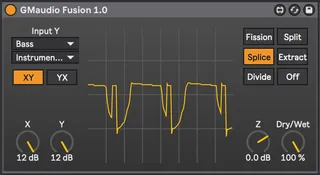
Ever wondered what it would sound like combining two sounds together mathematically? Well now you don't have to! This device allows you to grab audio from anywhere in your Live set (Y Input) and combine it with the audio that is passing through it (X Input), smashing the two sounds together in various ways like a Hadron Collider of audio destruction! This is GMaudio Fusion.
Its quite a simple device and yields unexpected results. It's great for glitching out drums, distorting basses or adding texture to leads and pads. The X & Y Inputs are combined using arithmetic in the following ways (more to come with updates);
- Dividing the two signals and outputting the remainder (Fission)
- Split the signals into positive and negative and combining them (Split)
- Allow one signal to pass when the other is at a positive value (Splice)
- Take one signals absolute value away from the others bipolar value (Extract)
- Multiply one signals absolute value by the others bipolar value (Divide)
The resulting Z output can change quite dramatically with changes in either signals amplitude. Combining simple synth sounds that are musically related can create new harmonic waveforms, while combining complex sounds, or feeding a sound back on itself, can quickly turn into the digital equivalent of sparks flying at you! So be sure to wear your safety glasses 😎
All important processing happens in gen~ for precision and is upsampled to reduce aliasing, but make no mistake, this is purely digital distortion and aliasing is unavoidable.
There is also a soft clipping algorithm at the end of the chain to limit the amplitude of the output which can be used to further distort the resulting signal.
I've also included an Audio Effect Rack, which allows you to use Fusion to 'Morph' Between sounds. Just select the Y input for each instance of Fusion in the rack and you're ready to use the XZY Macro to blend from the X input, to the Z Output, to the Y input, Effectively morphing between 2 sounds in new ways!
There is a lot to explore here and I would love to hear any feedback you might have.
I cant wait to see what you create with it!
Comments (6)
https://www.youtube.com/watch?v=C_p5iyMXmck