a better search for max devices
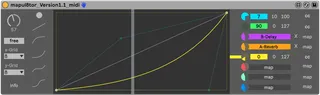
Mapul8tor screenshot

Mapul8tor

by lqud

Soundmanufacture and Fastlane offer Mapul8tor, a remake of M...

View on maxforlive.com Website

Type
Audio Effect
Author
lqud
Version
1.3.1
License
Attribution
Live version
10.1.
Max version
8.1
Downloads
1
Updated
2022-11-02

Description

Soundmanufacture and Fastlane offer Mapul8tor, a remake of Mapulator by Jonathan Kops aka BentoSan.

Mapu8tor allows you to graphically define the courses of 8 different parameters over the length of one virtual rotary control. Mapulator works like one of Live’s macros within a rack with one major difference : It enables you to set different courses for each of the 8 parameters you have mapped to it. Using Mapulator, you will be able to create unique series of automated effects on stage and in the studio using just ‘one knob’ on your controler.

Version 1.1

- added the possibility to init all 8 parameters in once

- added the Midi Device of Mapulator, where you are able to send Midi CC Messages out.

Comments (22)

  • Crampe · December 12 2020
    Thanks, awesome!
    You forgot a "clear all" button, though, especially since the device opens up with 8 very complex graphs by default.
    Smart never worked correctly for me, Mapul8tor feels really smooth and the UI is ver well thought out ;-)
  • lqud · December 13 2020
    thanks! Oh yes will integrate an Init button.
  • Crampe · December 13 2020
    Great!
    I did add a clear button, but strangely the mc.function init. state comes with graphs and many dots and I coudln't find where this is coming from...
  • DNSKI · January 09 2021
    Hi. i Like the Device, but i would use ist to Control my Hardware Sampler via CC. Is it possible to make a Midi Version of it?.
    Thanks ...
  • lqud · January 10 2021
    @crampe this is fixed ... btw. the init values are stored in the pattr ;-) cheers
  • lqud · January 10 2021
    @DNSKI Midi CC Out is added
  • kotten · January 11 2021
    Hi! This is such an elegant solution, nice work! There really should be something similar built in.
    One thing, are you suppose to be able to copy it together with say an EQ with some mappings to another channel, or am I pushing my luck?
    It seems to work fine, but only until I reload the project. I use the audio version with the EQ Eight, did a setup and then copied them both to several channels.
    It looks like it's still mapped but won't do anything before I re-map each parameter. same thing if I create a group with the two of them.
    (Ableton 10.1.30 and windows 10)
  • Grizzlywolf · February 13 2021
    Great remake, the only problem I'm having is that it doesn't save the mappings with projects/presets, so I have to remap it every time. I really hope this is a fixable issue...
  • lqud · February 13 2021
    @grizzlywolf please write to the support via mail
  • Crampe · March 11 2021
    Same here, the mapping aren't saved on preset/set reload.
  • lqud · March 12 2021
    seems to happen on some machines, here it works properly on Win & Mac. Anyway there's an update available which hopefully fixes this issue.
  • sanamok · May 04 2021
    How do I download?
  • jorgeuribera · August 28 2021
    Thank you for this device! This was what I was looking for and your remake works pretty good, just want to know something.
    I see that when the alt key is pressed to create curves, the arc of them changes in kind of big steps, is there a way to make it change with steps more little than those? I mean, to be more precise with the creation of these curves and values synchronization between parameters.
    Let me know if I need to explain this further.
  • Stromkraft · November 27 2021
    The site is broken and this can't be downloaded, at least in Safari 15.1 with no other sites acting up.
  • Beautifulgoblins123 · August 20 2022
    So i created an insturment rack with this for a kick drum modules that scans through some complex curves to get different sounds but I notice that i get a bug when I drag the instrument rack into a project- it seems that the mappings for some reason automatically remap themselves to different paramters in the project usually on the device before... seems to happen all the time and my fix is to make sure I load this device in first and then it doesnt happen it seems like. Curious if you've noticed this I will try to replicate the bug and figure out exactly what is happening- otherwise this seems to be the best "curve mapper" out there from what I've used.
  • lqud · August 20 2022
    @Beautifulgoblins123 - please, next time open a support ticket.
    This is explained quick. This isn't a bug, but the way Ableton Live handles it's parameters.
    You must know, that every time you create a new Live Project, all Parameters will get an unique ID and this ID exists only in one Live Project for this unique Parameter. In another Live project the same Parameter has another ID. Or the same ID has another Parameter.
    So I recommend, to store the Live project as a template. This should work. Or another workaround could be, to use the Midioutput and map the Parameters via Midi and IAC Bus or LoopBe1.
  • Beautifulgoblins123 · August 22 2022
    Ok thanks for the quick response and explanation. Didn't realize this, it seems like in most cases it works fine though? And if its the first thing I load into my project it seems like it has no issues- would it be safe to say I shouldnt run into this issue if I just load this device in first if I planned on using it?
  • moserobert · November 16 2022
    For me it's unusable with this issue of not being able to load it into my project without the ID's crossing and the device mapping to new objects. I was able to achieve this same result using multimap and mapr devices in tandem. It's not as elegant nor beautiful as this design, but it's reliable. If it's possible with these two devices, it seems like it should be possible with this one.
  • lqud · November 16 2022
    @moserobert this issue is fixed with the latest update ...
  • spacedriver · December 30 2022
    This is such a great device, really really usefull. Thanks for it!
    I'm running a minor issue though...
    When reloading a proyect I have to move the macro first to start working again. So in other words, it resets the values to their minimun every time I reload a proyect.
    I hope it could be adress in a future update. Cheers! :)
  • aprileon · July 11 2025
    If place many instances, say 8 Tracks with 8 manipul8ers each, it hogs the CPU and crashes when I close the project. the problem is somewhere in the version check, if I delete this part it does not happen...
  • soundmanufacture · August 18 2025
    @aprileon Version 2 of Mapul8tor is out, you can find it here: https://www.soundmanufacture.net/devices/mapul8tor-2

← Back to search