LoopTwistFindr.
This is a very simple and intuitive device made for resampli...
- Type
- Audio Effect
- Author
- Luvzofficial
- Version
- 1.0
- License
- None
- Live version
- 10.1.18
- Max version
- 8.1.5
- Downloads
- 610
- Updated
- No Updates
LoopTwistFindr. is an Audio Effect for Ableton Live by Luvzofficial, distributed as freeware, with no license specified by the author. It targets Live 10.1.18 and Max 8.1.5. On maxforlive.com it has 610 downloads. Published 2021-01-03. 6 user comments below.
New to Max for Live? Read what Audio Effects do, how device licenses work, how to install a device.
Description
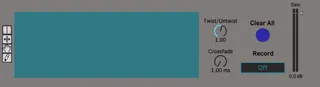
This is a very simple and intuitive device made for resampling and looping. You can create interesting percussion loops, chord progressions, pads and other unique textures.
It can use wave files and records live onto the max device buffer. It will only record while the record button is on. The device can control the playback speed and direction with the “Twist” knob. With the “Crossfade“ knob you can control the amount of volume duck each time the device loops a sample; it controls the clickiness. The dropdown menu contains the different ways the audio file can be selected with different modes….
Don’t be afraid to add multiple other effects in the signal flow to create even more interesting sounds.
It can also be used in a live performance setting with MIDI mapping the mentioned parameters.
This device was inspired by a program called Cool Edit that is
used by the artist Four Tet in his live performances and other extra parameters inspired by different Max objects.
You can see in this clip (@ 3:30) the idea behind this device
and its capabilities even though it is simple:
https://www.youtube.com/watch?v=9KIvnLBF7vU
Comments (6)
Authors: Luvzofficial & MisterBloo
This device is constantly looping so if you want to take a break from the loop you have been listening to, just turn down the gain on the device.
And it would be cool if Twist had the option to keep the Pitch instead of Re-Pitching. Thanks a lot :-)
Unfortunately I'm not able to make it work. Any known issues with M4L 817 Ableton 10.1.30 ? Thanks
what would be great in v2:
- normalization of the buffer
- timestretch
- automatization of moving head !?
when loading multiple instances of it, the wave is shared in all.
( one cant use multiple instances with diffrent wavs )
is there any chance for a fix ?! that means
every instance with its on buffer ?!
thank you !