- Type
- MIDI Effect
- Author
- Zidlont
- License
- None
- Live version
- 11.0
- Max version
- 8.1.9
- Downloads
- 4,616
- Updated
- 2021-04-09
MIDI Shaper2 is a MIDI Effect for Ableton Live by Zidlont, distributed as freeware, with no license specified by the author. It targets Live 11.0 and Max 8.1.9. On maxforlive.com it has 4,616 downloads. First published 2021-04-07, last updated 2021-04-09. 17 user comments below.
New to Max for Live? Read what MIDI Effects do, how device licenses work, how to install a device.
Description
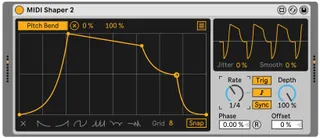
Ableton Shaper, which is powered by a MIDI signal, actually turns your Ableton into Serum or Phaseplant with infinite LFOs and the ability to modulate any knobs of any plug-ins, even on other tracks.
Tips and tricks:
- To bend a line, hold Alt (Option on Mac)
- To erase a dot, click Shift+left mouse button
- Click twice on the dot, it will circle around - that means sutain will start from this point
- You can modulate any parameters/knobs of any plug-ins on any tracks, from synths to effects
- You can expand the number of LFO maps (make more than 8 map routings) via CV Utility, that is part of "CV Tools" pack or using "MultiMap_button" by Sprk
- Just like in Serum there are two modes of LFO here: "Trig" - LFO will loop while the note is pressed. "Env" - LFO will hold at its last point, creating a sustain
- You can actually turn your Ableton into a synthesizer with endless effects and possibilities with this, it's all up to your imagination
New features in MIDI Shaper 2:
- MIDI notes now correctly trigger the LFO
- Disabled Snap mode by default for creating custom curves immediately
- Fixed graphical bugs - now Shaper mod is displayed perfectly with any theme and has the same appearance as Shaper from Ableton 11
- Minimized the scale of v1 mod - now it is the same by size as the original Shaper
- It is possible to disable the synchronization of the LFO with the notes using the Sync button
- R button (Retrigger) now works without restrictions
- Changed the default curve to a more editable one (triangular)
- Similar to synthesizers like Serum, LFO now works only when you press the notes, and when you release the note, modulated knob instantly returns to its original position
2.1 Update:
- For convenience an additional blue color has been added, which shows that the button has switched
- A couple more graphical bugs have been fixed
- The file size is optimized (1600kb before, 550kb now)
2.2 Update (Current stable version):
- The oscilloscope code has been changed to 100% stable, now the bugs with the mirror or disappearing oscilloscope are fixed
- CPU load decreased by ~10%
Comments (17)
I've tested this on several different versions of Ableton 10 and 11, and everything works nicely.
Make sure that you press the notes, and then you will see an image on the plugin's display
well... not on my computer, tested on Live 11 official and latest beta. I'm sending, of course, midi notes. In both cases, the device does the job BUT the live.scope window does not show any progress (PM ?)
I need to see this problem, record a video and send it in private messages.
Btw I made a small update, check it out now
This version differs in that it uses the code for the oscilloscope from Ableton 10 Shaper, which, in fact, works better, but as I noticed, it loads the cpu a little more.
Link to download MIDI Shaper v2.1a (Google Drive): https://bit.ly/31YLgYO
I don't know how to fix it yet. But I'll work on it
Is is possible to add a button to deactivate the "LFO now works only when you press the notes, and when you release the note, modulated knob instantly returns to its original position" feature, or a button to make the Shaper unipolar ?
In Env mode, releasing the key after a whole Shaper cycle when the shaper is at its lowest value (full negative) will make the target parameter go back to midpoint instantly, with a long release time on the sound you will hear the jump during release if modulating filter cutoff for example. It would be nice if the modulation stayed at its end of cycle value, either negative or neutral.
I've tried using 100% Offset, there is no more jump but it severely decreases the modulation amount available
Thanks
Thanks
Ok, it does work in Ableton 9 and Max for Live 7.3.4, but I am seeing the similar behavior as Spin posted.
Steps to reproduce:
1. Make sure there are no midi clips running on the target track
2. Add Shaper to the target midi track with instrument and map a parameter.
3. Disable Sync and change from Trig to Env.
- At this point the jit.pwindow shows the correct automation, and the parameter is moving accordingly
4. Start a midi clip or send a midi note to the track
- At this point the jit.pwindow shows still shows the correct automation, but the actual automation only triggers on notes from that point on and when the note off is triggered the parameter is set to the middle value.
I am new to Max for Live but will attempt to dig deeper into it with the editor if I can.
Thanks
Do you think it'd be complicated add the possibility of (1) saving presets of user defined functions and (2) morphing between different functions (as I think pattrstorage allows this)?
Also how complicated would it be to use this within Max directly?