a better search for max devices
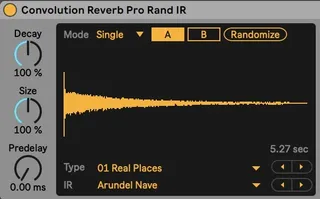
Convolution Reverb Pro Random IR screenshot

Convolution Reverb Pro Random IR

by alexwhite

A simple update of stock Convolution Reverb Pro with a butto...

View on maxforlive.com

Type
Audio Effect
Author
alexwhite
Version
1.1
License
None
Live version
12.0
Max version
8.6
Downloads
4,803
Updated
2024-07-16

Description

A simple update of stock Convolution Reverb Pro with a button than randomly picks an IR from the stock list.

1.1: Updated for Live 12, fixed Apple Silicon compatibility.

Comments (10)

  • Torley · July 04 2023
    @alexwhite
    I adore this idea but it's not working for me in Ableton Live 11.3.x ... are you able to update it? I've long wanted to just hit a random 🎲 button to select an impulse response from an existing collection.
  • dekmantel · July 22 2023
    It doesn't work in Live 10 either. Seems like it was not frozen on save, so there's a whole bunch of stuff missing.
  • TheRock · February 17 2024
    Working great on Ableton Live10. Love it.
    Where could I find a written User Manual for it? Some deeper explanation of all of the button sets...
  • Nofolobricity · June 07 2024
    It doesn't work. But it's so good idea
  • alexwhite · July 16 2024
    Thank you all for checking out the device. I've finally managed to update it, works with Live 12.0. Please let me know if you encounter issues.
  • Torley · July 18 2024
    @alexwhite Thanks so much for the update! I confirm it's working for me in the Live 12 Beta. Do you have a recommended way to point it to custom IR folders? I see it's referencing the Factory Packs > Convolution Reverb > IRs, but when I add in more folders, it doesn't appear to pick from them. I also tried replacing "IRs" with a symbolic link to my main impulse responses folder outside of this folder structure, but that didn't appear to work, either.
  • alexwhite · July 22 2024
    @Torley I couldn't find a way to dynamically fecth the list of folders, so for now it "randomizes" only within 11 folders. However, you can substitute default folders with yours, the trick is in the naming: you should use numbering like other folders have, i.e. "00 ...", "01 ..." etc. I merged default folder with plates (digital and real ones into a single folder), and placed my folder like "08 Recordings", that worked for me.
  • Torley · July 22 2024
    @alexwhite Thanks for the tip! Good to know that's how it works.
  • Prison · November 12 2024
    Hi, great device, but I was wondering if it was possible to map the randomize button so that it could be controlled with a control surface, or to automate it. I tried to change this by editing the device, but I couldn't make it accessible for mapping. Thanks for your help!
  • N1ck · April 22 2025
    Hi, I'm running Live 12.1.11 and Convolution Reverb Pro doesn't seem to be working. Is there something wrong I'm doing?
    Thanks

← Back to search