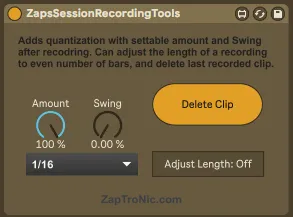
Zaps Session Recording Tools
This tool solves a few missing features in Ableton Live that...
- Type
- MIDI Effect
- Author
- MasterZap
- Version
- 1.1
- License
- None
- Live version
- 10.1.18
- Max version
- 8.1.5
- Downloads
- 578
- Updated
- 2023-03-04
Zaps Session Recording Tools is a MIDI Effect for Ableton Live by MasterZap, distributed as freeware, with no license specified by the author. It targets Live 10.1.18 and Max 8.1.5. On maxforlive.com it has 578 downloads. First published 2021-05-13, last updated 2023-03-04. 9 user comments below.
New to Max for Live? Read what MIDI Effects do, how device licenses work, how to install a device.
Description
This tool solves a few missing features in Ableton Live that always frustrated me. It does three things:
1. FLEXIBLE POST RECORDING QUANTIZE
Allows you to do Quantize after recording MIDI, to a given PERCENTAGE and a given SWING. The built in Recording Quantization function of Live is always at 100% and with 0% swing. This fixes this problem. TURN OFF the built in quantize if using this!!
2. MIDI MAPPABLE "Delete what I just recorded" BUTTON
If you do mistakes when recording things live, you will find "Undo" is not midi-mappable, plus when using some helper tools, you may need to undo several times to get rid of a track.
This tool adds a "Delete Clip" button. When you press it either WHILE recording a clip or just AFTER recording a clip, it will delete this clip - immediately.
As a bonus, if you hit it AGAIN, it will start recording on the same clip immediately. Very handy in a live situation to simply abort recording that is going wrong (and launching another one).
MIDI map this to something easily reachable (like a footswitch) for maximum awesomness.
3. CLIP LENGTH ADJUSTER
Ever been in the middle of recording a loop, playing instruments with both hands and feet, and wanting to stop the recording of the loop... but you JUST missed to press "stop recording" in time.... so now abelton records 4 bars of what you want and 1 bar of useless nothing?
If this happens to you, turn on the "Adjust Length" button. What it does:
If you record a clip (audio or midi) that has an odd number of bars (except one bar, which it allows), it will slice off the odd-numbered bar RIGHT after you close recording.
So if you accidentally hit "stop recording" a little too late, this will auto-fix it for you.
HOW TO USE:
Just put this tool on any MIDI track (only needs to exist once in your entire song) and it will automagically take care of everything for you.
Comments (9)
First, after deleting the clip, it always retrigger the recoding of the same slot, that is not the behaviour you described for it (it should be pressed twice for that).
Also, it would be nice that it could behave this way on any number of recorded clips at the same time, since for example in my case sometimes I want to record a drum beat and a bass line at the same time, it just deletes one of the two in a random way.
I've tried it on both Live 10 and 11.
I'm gonna keep trying to solve it myself, but I'm not acquainted with M4L developing.
Thank you.
Thank you, it's insanely useful for myself, so I made it. The more people that can enjoy it, the better.
@flariut
That's odd, it works correctly for me. Note it only saves the reference to a single clip when recording, so it won't work for multi-recording, sorry :(
Obviously you can open it up and look inside if you need to change it.
@johhnyringo
Yeah, it probably only works in session recording mode... that's what it was made for. See my livestream for it used quite heavily (zaptronic.com)
The track (where the clip recording is happening) has to be armed manually.
When using the "-EnableArmOnSelection" function in the options.txt file of Ableton, sadly, your device does not work! (The arm-color is a darker red when arm on selection is used. The normal arm color is much brighter red.)
Could you pleeeeasse make a upgrade to the device, so that it's working with this other arm-variant too? i can pay 5 dollars/euros for that. :)
My whole workflow within my liveset is based on the fact that i can scroll through my tracks and every track gets automatically armed. Arm on selection is vital for me.
But now i encounter the same bug another commenter here has:
When pressing "Delete Clip" ONCE it not only deletes the clip, but automatically records a new clip.
I also added a "select current scene" feature, which is something I need in my sets....