- Type
- MIDI Effect
- Author
- aliced25
- Version
- 1.5
- License
- AttributionNonCommercial
- Live version
- 10.1.18
- Max version
- 8.1.5
- Downloads
- 405
- Updated
- 2021-06-04
3P-SEQ is a MIDI Effect for Ableton Live by aliced25, distributed as Creative Commons Attribution-NonCommercial. It targets Live 10.1.18 and Max 8.1.5. On maxforlive.com it has 405 downloads. First published 2021-05-10, last updated 2021-06-04. 1 user comment below.
New to Max for Live? Read what MIDI Effects do, what the AttributionNonCommercial license means, how to install a device.
Description
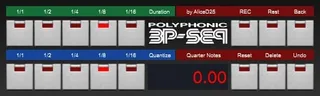
Polyphonic Step Sequencer inspired by Roland JX-3P
first create a MIDI Clip (the Clip must be highlighted)
press the Device Panel to open the UI window
choose your Quantisation / Duration and start recording (press Rec)
record mono- polyphonic keystrokes from your Keyboard or Midi Device
to add Rests use the Rest Button (Rest depends on Quantisation)
to step back press Back Button (Back depends on Quantisation)
for Overdub: reset the Note Counter (Reset Button)
Undo Button erase Steps (depends on Quantisation)
Delete Button: erase the whole Sequence
Note Counter shows Quarter Notes
stop recording before playback the Clip
Comments (1)
1.5 add Back & Undo Button