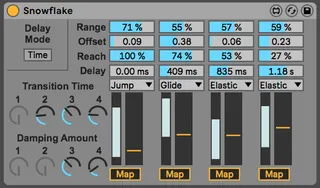
Snowflake
'Snowflake is a Max MIDI Effect for random CV generation, d...
- Type
- MIDI Effect
- Author
- ReachingEquilibrium
- Version
- 1.1
- License
- AttributionNonCommercialShareAlike
- Live version
- 10.1.35
- Max version
- 8.1.10
- Downloads
- 0
- Updated
- 2021-05-18
Snowflake is a MIDI Effect for Ableton Live by ReachingEquilibrium, distributed as Creative Commons Attribution-NonCommercial-ShareAlike. It targets Live 10.1.35 and Max 8.1.10. First published 2021-05-13, last updated 2021-05-18. 7 user comments below.
New to Max for Live? Read what MIDI Effects do, what the AttributionNonCommercialShareAlike license means, how to install a device.
Description
'Snowflake is a Max MIDI Effect for random CV generation, designed to make every note as unique as a snowflake. Every incoming MIDI note triggers 4 random values to be generated, which can be mapped to parameters in Ableton Live. Snowflake allows transitions between values to be instant, smooth, or ‘elastic’, with intuitive and easy-to-use controls for sculpting your CV output to perfection.'
This is 1 of 4 devices I've made as a uni project, and am now looking for feedback on. All 4 are made to be super quick to use - check the Quick Start section in the manual to get them up and running ASAP. I'm entirely self-taught so any comments are appreciated!
---
v1.1:
- Bug fixed where not all controls were showing up for some users.
Comments (7)
BTW ...very cool and metaphoric name.
😊
Also cheers for the feedback - I originally had the triggers mappable, but ran into the issue that every time the ducker was triggered it would take up space in Ableton's undo history, which made it pretty unusuable. Definitely keeping it in mind though.
I am grateful on your effort and energy, and willingness to share it here.