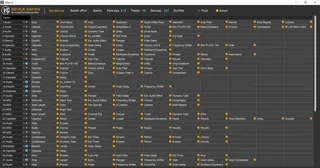
Device Matrix
Device Matrix is a Max for Live plug-in, which lets you disp...
- Type
- Instrument
- Author
- konstantinklem
- Version
- 1.1
- License
- Commercial
- Live version
- 10.1.18
- Max version
- 8.1.5
- Downloads
- 0
- Updated
- 2021-10-19
Device Matrix is an Instrument for Ableton Live by konstantinklem, distributed as a commercial (paid) device. It targets Live 10.1.18 and Max 8.1.5. First published 2021-08-18, last updated 2021-10-19. 6 user comments below.
New to Max for Live? Read what Instruments do, what the Commercial license means, how to install a device.
Description
Device Matrix is a Max for Live plug-in, which lets you display and control up to 500 Ableton Live (or VST) instruments and effects on a single screen. It is your perfect assistant when mixing, doing sound design or producing music. It is fully compatible with Ableton Live 10.1 and Ableton Live 11 (and higher).
What's new in version 1.1 :
- The number of tracks has been increased to 50, and the number of devices to 500;
- The ability to open Device Matrix using the keyboard was added;
- Now you can select tracks from Device Matrix;
- The ability to control the Dry/Wet (Mix) parameter for VST plug-ins was added;
- Some bugs have been fixed.
Demo update 1.1: https://youtu.be/YD3Y34nToF0
Comments (6)
The standalone Max is the latest release, 8.2.1.
It would be great if this could be fixed so I can use both devices together - as it stands I currently have to choose to lose some functionality in one device or the other.
Thanks in advance!
I cannot reproduce this issue on my test machine. Most Ableton Live users use the built-in version of Max. However, in the next version I will try to solve the problem you mentioned (if I can catch it)
Cheers,
Konstantin.
Unfortunately in order to use Miraweb to control the other device (Browser Mapper) with iOS, I don't think I've got any option other than using the standalone Max since Miraweb needs Max 8.2 to run, and the built-in version seems to be 8.1.11. I've spent a long time looking for a solution but I'm stumped. The most annoying thing is, if the actual Mira app displayed in portrait mode none of this would be a problem, but it only seems to open in landscape. Using Miraweb seems to be the only option to get it to run in portait.
Thanks for your time!
Martin
Please, send me message via social services: https://konstantinklem.pro/contact/
I will try to help you.