Timing Sensitive Midi Looper
Timing Sensitive Midi Looper is a lightweight zero latency m...
- Type
- MIDI Effect
- Author
- krito
- Version
- 1.4.3
- License
- AttributionNonCommercialShareAlike
- Live version
- 11.3.41
- Max version
- 8.5.8
- Downloads
- 4,263
- Updated
- 2025-06-05
Timing Sensitive Midi Looper is a MIDI Effect for Ableton Live by krito, distributed as Creative Commons Attribution-NonCommercial-ShareAlike. It targets Live 11.3.41 and Max 8.5.8. On maxforlive.com it has 4,263 downloads. First published 2021-09-26, last updated 2025-06-05. 47 user comments below.
New to Max for Live? Read what MIDI Effects do, what the AttributionNonCommercialShareAlike license means, how to install a device.
Description
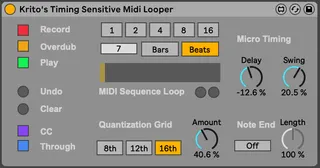
Timing Sensitive Midi Looper is a lightweight zero latency midi looper, made for live midi looping with adjustable quantisation on the fly.
Looping Section:
- Playback: Plays the recorded sequence.
- Recording: Records incoming notes.
- Overdub: Preserves previously recorded notes when active.
- Clear: Deletes everything.
- Undo: Removes the last recorded layer.
Loop Length and Position:
The device syncs with Ableton Live's transport, following its time signature and song position.
Quantisation:
- Grid: Choose from 8th, 12th (16th triplets), and 16th notes.
- Amount: Set quantisation from 0% to 100%, preserving the original sequence at 0%.
- Swing: Add swing feeling (-100% to 100%) relative to the chosen grid.
- Delay: Move notes in time (-100% to 100%) relative to the grid size.
- Note End and Length: Quantise note ends and lengths (gate time 0% to 200%).
Note: Swing and delay settings depend on the quantisation amount.
More Features:
- CC Support: Record and play Pitchbend, Modwheel, Aftertouch, Polypressure, and CC messages.
- Through Button: Choose to let through or block incoming midi notes.
- Automation and Mapping: All parameters can be automated and mapped to MIDI remote control.
- Stable Midi Output: Ensures no hanging or overlapping notes.
- Non-Destructive Quantisation: Original notes remain unchanged.
- Realtime Quantisation: Adjust settings on the fly during playback.
- Performance: Minimal impact on CPU usage; no latency introduced.
Known Bugs and Limitations:
- Extreme swing settings may affect the order of pitchbend, modwheel, or cc messages.
- Swing parameter in the 12th grid may not transform it into a 16th grid.
- MPE not supported
Future Features:
- Save the recorded pattern with Abletons save
- Replace Mode: Deletes underlying notes when a new one is played.
- Transpose Mode: Transposes the playing sequence based on the last incoming note.
Feedback is welcome!
Have fun exploring the Timing Sensitive Midi Looper.
If you like this device, you can support me here:
https://buymeacoffee.com/krito
Comments (47)
good job!
I test this
thx
thanx for your good device!
I love Midi Loopers especially if they offer an option to disable the "through" output like yours :)
One thing: If "overdub" is not activated (just with "record" and "play" activated) the loop (e.g. after 2 bars) is not playing as recorded, just a few tones are audible ...
I´m on Live 10.1 / OSX Catalina.
Also it shouldn´t be possible to activate "record" and "overdub" in parallel. After recording something with "record" and pressing "overdub" afterwards should automatically change the state of the "record"-button.
:-)
I am glad that I can automate the record/overdub/play/clear buttons via automation lanes in the sequencer view, however it would be much more useful if this automation showed up in the same way as the native looper device. Eg. as a single automation lane for state as opposed to individual automation lanes for triggering the buttons.
Thank you for all this feedback!
I have uploaded a new version to improve on those areas you commented:
1. As I get from the comment of @spacesoul, is that the meaning of the record, overdub and play buttons is ambiguous: Instead of a single state button as used by many loopers I followed the design of this device: https://maxforlive.com/library/device/1757/ck-midiloop
The downside is you can not use it with a single button, however it is a bit more clear what is happening when pressing a button. To make that more clear, buttons without a meaning are greyed out now: For example, "play" has no meaning when "record" is on and "overdub" is off. This is shown in the interface no more clearly.
2. There was a bug that some notes would be played in "record" mode without "overdub" but "play" turned on. I fixed this.
3. @dazeofresistance I clearly see the use of a single automation lane for "Sequencer Mode". I could not reasonably fit a "Sequencer Mode" button on the interface, but I added an automation parameter with that name. You can select it in the automation view as a device parameter. Here you can choose between "off", "Record", "Overdub" and "Play". These modes then change the values of the buttons, and also overwrite their automation if present.
I hope you all enjoy the update! Let me know :)
Krito
i came from hardware sequencer ...good job.
anyway im kind a new here.
in addition to overdub mode...it will be also good that u can add midi replace mode (overwrite).
like on korg emx1 or arturia keystep...for example when have a simple sequence running and u r on the overwrite mode and record , only when u play keys it will replace the notes in the same position that already was in the sequence.
it gives u rythmic fill to play...think about that.
anyway do u think it possible to do ?
tnx a lot man , peace !
Just what I needed for my current rig, this is great!
I can see and hear the midi modulation changes going into Live when I move the wheels, but the sequence is recorded "flat", i.e., without the pitch or mod wheel changes. Is this normal or am I doing something wrong? Thanks for your help!
Mac mini M1, OS 12.2.1, Live 11.1.5b
Been using your looper with pleasure in my arrangement view live set. Love it! The only thing which doesn't seem to work properly a lot of times is the quantisation (so I put it off sometimes unfortunately..). It seems to make little hick-ups in timing, some 16th are delayed, one 16th note.. Also, it doesn't seem to work in odd meters, like 6/4, it starts shuffling then (kinda funny, but not what I need haha)..
Maybe something to check :)
The best,
Niek
@dawnofanewworldmusic
After some troubleshooting I found that it messes up the quantisation grid, probably because of tempo-changes in my set. I deleted the device and put it back with just one track (it automates only in one tempo (4/4 114 BPM) and then it seems to have found the right grid again..
Before I used one looper throughout the whole set for one instrument-group (drums for example), I tried to map the 'clear' button every time a song or the BPM changes. But this didn't seem to work.. That's a pity, because tempi might change during songs. ;)
Niek
I have uploaded a new version:
- Quantisation now works on any time measure, not only 4/4.
- You can decide between beats and bars as unit for the loop length. This enables you to do polyrhythms for example with a length of 7 beats on a standard 4/4 measure.
- Added assignable multi-buttons as an alternative way to change the loop length.
Enjoy
Krito
I have just one thing on my wish list:
I'd love to have the option to have the Through option enabled only when not Playing. So I would have the input coming through until I (record and then) Play. Then while playing the loop the Through is disabled so I hear only the loop.
Then it would be just perfect!
Thank you for the updates! I totally forgot about this thread.. I'm gonna try the updated version in my live set soon and let you know about the odd-meter stuff. :)
Niek
could anyone of you please be so kind to make a Youtube demonstration of this device? It looks really fascinating, but i m too dumb to use it...
Thanks in advance :)
Amazing plugin, I'm almost at the point where I would use it regularly. Although I have a bug that hinders me from it. If I play the song at a start point where the sequence would start from the beginning, it ignores the first note. The note is played however when it loops. I only can it bring to play if I crank up the delay knob on the micro delay section.
Tested under Ableton 11.2.10 under Mac OS (M1)
Do you think it's possible to integrate also midi CC (like modwheel or other midi commande) ?
I released a minor update on this device, which mainly fixes the bug reported by mangomeat:
- The first note is not dropped anymore when starting to play a previously recorded sequence under normal circumstances. It may still being dropped when using lots of negative delay or the note is supposed to move into negative time for other reasons, e.g. recorded note is very late and lot of quantisation amount. (Thanks for reporting!)
- Playing with the grid settings is more stable and less likely to lose notes or play them twice
- Changed the default settings so that the device is ready to record and play
Enjoy!
I just uploaded a minor update on the device (v1.2.2):
- Undo Button: It let's you undo the current/latest recording layer of the loop. A new layer is created whenever you turn on record.
Enjoy!
Krito
I have updated the device (v1.4):
- Support CC messages: It is now possible to record and playback Pitchbend, Modwheel, Aftertouch, PolyPressure and other CC messages.
I have tested the device as good as possible, if you find any issues, please let me know in the comments!
Cheers,
Krito
tnx for the amazing updates . im using this device always ...
simply one of the best devices out there for live jamming artists..
i really really cant wait for the REPLACE MODE update . when it will be release ?
by the way , Please make an "clip" button that send the existing sequence to new clip in ableton . :-)
tnx again :-)
- A reset clock button - reset the looper's clock back to the first step on quantization
- The ability to store and fire off more than 1 pattern!
- Implementing the replace mode is not straightforward due to its interaction with undo. Adding this feature may take some time.
- @raverpavel: I've investigated the issue you mentioned with multiple midi loopers but couldn't reproduce it. I'd like to fix it, but I need your assistance. Please share an Ableton project, a video demonstrating the problem, or provide a detailed explanation of how to replicate it. You can send it to [email protected].
- Regarding the reset clock button, @d0gselfie, could you clarify its purpose and function? Is it for shifting looper content to different timings? While I'm considering this idea, I'm unsure about its usefulness and the interface design, as I don't want to replicate Ableton's existing MIDI editor.
- I won't be adding the ability to fire multiple patterns since this can be achieved easily with multiple loopers.
- Pattern save has been added to the roadmap as a high-priority feature. It will save the pattern whenever the Ableton file is saved and will be implemented next.
Now, for the inevitable feature request, haha - do you plan on adding MPE support at any point in the future / could you give me some pointers towards implementing this functionality ?
Do you by any chance have some troubleshoot idea ? :)
Thank you so much for the feedback and the bug report on MPE.
I don't have an MPE controller, which makes the whole MPE suppport quite difficult to test for me.
But maybe you could help me here:
You could record an MPE sequence with the ROLI Seaboard to a midi channel in Live, that crashes the midi looper, and then send that live project to [email protected] :) that way I can reproduce the issue and have a way to fix it, essentially adding MPE support. If you do that, please do it with an Ableton Live 11, I haven't upgraded to 12 yet, you know, money is short.
Depending on how difficult this is to fix, I might be able to roll out an update in the next few weeks.
thank you for this perfect looper!
Sometimes I use your looper with a Logidy UMI3 foot switch midi controller and I was wondering if it's possible to turn off quantization and record a loop without time limit.
Please keep up the good work!
warm regards,
Martin
I have some suggestions/problems:
- State saving would be most welcome! Every time I start my project all your Midi Loopers are running and recording per default which is not a good thing.
- I have Midi mapping problems with the five measure buttons at the top. The number field below is mappable with a knob (of iOS Midi app Lemur) but it is hard to recall exactly the desired beats/bars.
- It really would be great if you could implement several buttons (beside the five buttons: 1, 2, 4, 8, 16) for repeat length (e.g. from 1/16 to 16 where 1 is the original length). These buttons would shorten or expand the original length without changing the tempo. So you could get some micro looping stuff (1/16). Expanding would copy the notes.
- More variation in the Quantization Grid would be welcome (like 4th, 2th etc.) to get temporary chords while improvising.
- I have an Osmose keyboard. Unfortunately MPE is not really supported yet. Let me know if I can help you with testing etc.
Thanks again and many greetings from Hamburg! ;-0)
I have updated the device to address the issues:
- number buttons at the top now can midi map
- device state on startup does not resets anymore
I like the idea also of being able to shorten the length for micro loops and extend it with copy instead of slow, but I am not yet convinced of how to design this idea in a good way.
Unquantized Midi loops will most likely not be supported anytime soon, as this feels almost like a new device.
MPE support will also have to wait for now. Although this is a feature I would like to support, I don't have access to any MPE devices for now.
Enjoy
Krito
I'm trying to use this in session view. I have clip automated to record within looper, given a follow action, then a clip to automate playing.
My problem seems to be when I simply want to stop the track the looper will still play. Even when I automate everything from its off state. I can go to other clip and the play button inside looper will go back to its off state properly, but not when I just press stop on the track.
The workaround I have found is to automate the play button inside looper to turn off on the last 32nth of every bar, so that it will always be in the off state when i launch another clip in my 1 Bar global quant. Luckily I am only playing 1/8th note midi pre qualitized so I'm never missing a note with this.
However, I am experiencing crashes when I want to use this method on 3 or 4 tracks. Clip view will eventually get stuck, And the session wont be able to close without crashing.
Maybe I'm missing something. But I love how this device lets me add live midi to a clip that already has midi inside of it. I have yet to find a convenient way to do that and re-dub through just clip launching.
So the first problem you describe is pretty much a result of how the midi looper is not really compatible with the way clips work, because you control it through automation instead of clips. I am not sure if there is a way to configure clips so that their automation changes get undone whenever they are stopped or finished, but if there is that would be the way to go. Your workaround seems to kind of do that.
Regarding the crashes, I would guess that is because you use non-empty clips with the looper: In that scenario, whenever you record while the clip is playing, all notes of the clip will be recorded into the looper again and again, and after say 32 bars, the looper will send out each note 32 times instead of just once, likely overloading the next vst synth in the chain.
Instead I would recommend to use two seperate midi channels, one with the notes, and one to control the looper. Both channels then can send their midi to where the sound is produced, which could be a third channel with a vst or an external instrument.
Hope that helps
Krito
May I buy you a coffee/beer?
I greatly appreciate the ability to midi map the parameters. Additionally, I like your idea to transpose the recorded loop as a future update. I would personally like the transpose feature to be midi mappable via a note selection drop down. Thank you again for this great device!
https://buymeacoffee.com/krito
The transpose feature would look like this:
There is a dropdown, where you can set the reference note (or maybe an option to record it, don't know yet, or the first version just has standard c), and then, when transpose mode is on, incoming notes will not be recorded, but instead transpose the playback. However, although I really like the idea of playing with a sequence like this, there already a similar way to do this: if you put the ableton midi transpose device after the looper, you can adjust a range of notes to the transpose amount in the midi mapping section, giving you a very similar experience.
For this reason, I might give other features precedence:
1. I'd really like a way to save the sequence when the session is closed. Right now, when you play with it in a non-live setting, you always have to record everything into midi and cannot refine once you close the session. Unfortunately the Ableton API makes this quite difficult. This leads to ->
2. Would be nice to just drag out the sequence onto a midi track so you don't need to record it.
3. Replace mode: When Overdub is unselected, replace mode would be the default, which means old notes get only deleted when you play in new ones.
4. Ideally I would like the undo button to be a bit more predictable. I find myself often never turn off the record button, and in that case undo and clear is always the same. Not ideal. Ideally you could do many undos, see a prediction of how many notes will be undone, and have a redo button. Let's see.
5. I feel CC needs a bit of rework: Pitch bend should always be included, as this is not really a CC. And for stability of that feature, I will need to add a garuantee that the order is being preserved, otherwise we will have hanging pitch at certain quantization settings.
6. MPE Support has been asked quite a few times now. As soon as I find the time to learn how it works I will put it in!
Cheers,
Krito
My only gripe - probably more of an Ableton gripe than anything else - is that it seems like the quantize works by quantizing to 8/12/16ths, THEN letting you add swing. As opposed to creating a new swung grid and quantising towards that as in other DAWs (Cubase and Logic for example).
So in using swing it's first necessary to get rid of any feel you might have, then the swing is from the perfectly straight values. It's not the end of the world but it's not ideal.
Like I said, I think that's an Ableton limitation. Everything else is great - a very, very useful device.
Thank you very much for the beer and the kind words!
I made the quantization logic quite some time ago, so i had to look it up, but you are absolutely right. This is exactly how it is calculated. This logic is custom, so it has nothing to do with Ableton. I don't remember why I did it this way, tbh probably because it was the easiest to implement at the time. I will be happy to change it to the way you suggest, because it is obviously better to quantize towards the right grid in the first place.
Thanks for the insight!
Krito
I have noticed, however, that every few times I close and reopen the set one of the instances won't work and I'll have to delete and re-add it and map it to my controller again. It's not the end of the world but I wonder if there's something I can do to minimise that?