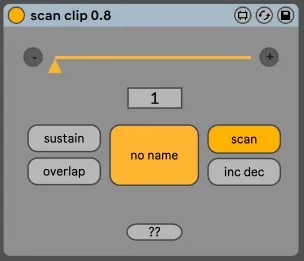
Scan Clip - Midi CLip Scrub device
This device "scrubs" any midi clip of your live set with a...
- Type
- MIDI Effect
- Author
- schlam
- Version
- 0.8
- License
- None
- Live version
- 11.1
- Max version
- 8.2
- Downloads
- 564
- Updated
- 2021-10-24
Scan Clip - Midi CLip Scrub device is a MIDI Effect for Ableton Live by schlam, distributed as freeware, with no license specified by the author. It targets Live 11.1 and Max 8.2. On maxforlive.com it has 564 downloads. First published 2021-09-27, last updated 2021-10-24. 2 user comments below.
New to Max for Live? Read what MIDI Effects do, how device licenses work, how to install a device.
Description
This device "scrubs" any midi clip of your live set with a slider.
- select a clip (even in another track)
- move the slider
- that's all
Not tested in Live 10 but should work.
Cheers !
Julien
__________________
Release notes :
_________0.8
__no more "map issue", the process is easier
__the name of the current clip is indicated
__2 modes for the slider : regular scan or "increase/decrease"
__help file updated
_________0.6
___device frozen to include help file
___initial state of the lock/learn button changed
___lock/learn button blink
_________0.5
__Add a "Pedal map" button. Map the dial to your expression pedal. Now, each time you press your pedal all the way down it will go to the previous note/chord, and all the way up it will go to the next one.
_________0.4
__Add "map mode".
If you need to map the slider to a controller or another parameter : click "mode map" first.
The range of the slider is changing accordingly to the clip's number of notes/chords. Live doesn't like when you dynamically change the range of a parameter and doesn't update the min/max range in the Midi map mode..
In this mode, it is not possible to trigger several time the same note/chord, but the slider can be mapped.
For information, it can be mapped too in the regular mode but you will have problems if you change the clip after the slider has been mapped, if the new clip doesn"t have the same number of notes.
__ Add of the "overlap" mode.
It will respect or not the initial lenght of notes. In this mode, if you move the slider to the next note/chord while the previous one is still playing, you will ear all of them.
___Add of the"sustain" mode.
It makes the current note/chord "sustained".
If "overlap" and "sustain" are both On : after moving the slider all the way long, all the notes of the selected clip will be held in the same time.
___ Add "Help" button
__________0.3
Initial release
Comments (2)