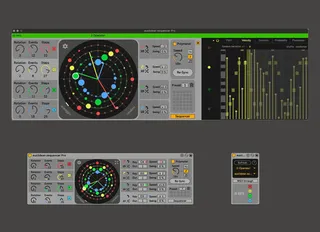
Euclidean sequencer Pro
Compose with polyrhythms and polymeters fast and intuitively...
- Type
- MIDI Effect
- Author
- alkman
- Version
- 2.1
- License
- Commercial
- Live version
- 10.1.2
- Max version
- 8.1
- Downloads
- 0
- Updated
- 2025-11-29
Euclidean sequencer Pro is a MIDI Effect for Ableton Live by alkman, distributed as a commercial (paid) device. It targets Live 10.1.2 and Max 8.1. First published 2021-09-27, last updated 2025-11-29. 101 user comments below.
New to Max for Live? Read what MIDI Effects do, what the Commercial license means, how to install a device.
Description
Compose with polyrhythms and polymeters fast and intuitively. Create evolving melodic or percussive mathematical rhythms. It is a 4 voice sequencer which allows for a lot of customisation. It comes bundled with a second MIDI device "euclidean out" which enables routing any of the 4 voices to any MIDI track in Live. "Euclidean sequencer pro" is the successor of the euclidean sequencer including many new features(see key differences below).
Push 2 & Push 3 ready.
Demo video:
https://www.youtube.com/watch?v=DzjojiwfzYw&feature=youtu.be
On euclidean rhythms
https://youtu.be/wf6j1icUOVE?t=311
Walkthrough video by Catalyze Music academy
https://www.youtube.com/watch?v=orh9TtREa0w&t=6s
***Update 2.1***
*Added version info in the settings panel.
*Fixed an issue where the parameters steps and events were registering twice in Live's undo buffer
***Update 2.0***
*Various optimisations in the backend engine. The device runs more efficiently and uses less CPU and ram.
*Fixed an issue for voice D arpeggiator where MIDI input from clips wouldn’t operate as expected.
*Fixed an issue where click and drag on the main UI could result the device to temporarily freeze under very heavy load.
***Update 1.2***
Euclidean sequencer Pro:
*Fixed an issue where an automated preset number box was disabling automation.
*Fixed an issue with step duration under free polyrhythm mode, occurred when Live's tempo was automated.
*Edited info view text for sequencer mode window.
Euclidean out:
*Fixed an issue where notes were not received correctly or the connection was getting dropped under certain systems.
*Fixed an issue where the refresh button was resetting the name of the instance selected.
***Update 1.1***
*In sequencer mode you can MIDI monitor all notes edited in the sequencer. Toggle monitoring on/off by clicking on the new headphones button.
*Added semitone up/down transposition buttons for the sequencer mode.
*GUI elements are not rendered blurry on non-retina monitors.
Key features/differences from euclidean sequencer:
* Switch easily between polymeters and polyrhythms by toggling the corresponding button.
* Click and drag on the main UI panel to dial velocity value for each individual note. Shift click-drag to adjust the velocity of all the notes in that voice.
* Comes with “Euclidean Out” which allows you to route the MIDI output from each voice in any MIDI track inside Live(please note that due to live's architecture when you use this method there is a small latency to the notes. This is relative to the audio buffer of Live. E.g. 12ms @512 samples and 4ms @128 samples.).
* Clock divider/multiplier for each voice. It can be either a common multiple or a non-divisible value.
* Control any accesible parameter in live by mapping it to any of the four sequencers.
* Individual note duration for each voice. Duration is measured in step multiples or divisors.
* Scale folding functionality with root note and scale selection for the sequencer mode.
* Individual swing for each voice.
* Juno like arpeggiator for each voice.
* Use midi clips or midi keyboards as note input for the arpeggiator.
* Randomisation window for randomising all or certain parameters .
* Control the master speed in Note values triplets or Hz.
* Allow each instance to act as a master or slave device and receive/send “RE-Sync events” “preset value changes” or Clock parameters.
* Control when the Re-sync, preset change and voice activation events occurs. Trigger them according to live’s quantisation, every new bar or immediately.
* Confirmation window for the delete preset button.
* Link preset value changes to scene value.
* All the functionality of the main window now available in the floating window too.
* Redesigned and optimised engine.
* GUI elements optimised also for non-retina screens.
* Change the colour of each voice.
* MIDI through toggle.
* Push 2 integration.
* You can drag and drop a json preset file upon the device to load presets
* When saving preset file the filename automatically appends the date and time.
* Added more preset slots.
All UI objects contain descriptions for Live’s info view.
More info on euclidean sequencers :
http://cgm.cs.mcgill.ca/~godfried/publications/banff.pdf
Highly recommended book on euclidean rhythms and more:
https://www.taylorfrancis.com/books/mono/10.1201/9781351247771/geometry-musical-rhythm-godfried-toussaint
Requires max for live & Ableton Live 10.1.2 or later
All updates will be for free.
Comments (101)
I wish a VST version to use it with another DAW
Thanks!
Is there a workaround to get it to work in 11 or is it just not released yet ?
But for some reason i can't figure out how the preset section works. Could you please explain?
I have just realized that the speed dividers/multipliers cannot be set to :7 and x7, respectively. Is this intended?
(Not that I would probably need that to make things even MORE unpredictable, just curious.)
Keep up the great work!
--
Marco
Can you please help me Alkman?
Let me know if that works, else send me an email and we will figure something out.
[email protected]
Thank you as well as for your quick answer.
I can see that presets can be automated via the currentpreset paramater, but is there a way to change presets via midi note?
I am glad you like the sequencer.
I tried to keep the device as less bloated as possible so I decided not to add features that you can add with other M4L devices.
In your case, you can achieve this with a free device that maps MIDI notes to MIDI CC.
I really love your Euclidean Seq Pro. I'm a customer. I downloaded 1.2. I am using Live 11.1. There is a bug on my system. The Arpeggiator doesn't take the MIDI in on channel D. It only pulls the MIDI from the sequencer. I have selected "active on" for D in the Arpeggiator popup, and "from MIDI clip or keys". It still pulls from the sequencer. If I select "from sequencer" it also pulls from the sequencer. The other three channels A-C work fine with pulling MIDI from a clip in the Arpeggiator. I'm sure this is a quick fix. Would appreciate if you are able to turn it around quickly. I'm using it for a current composition. Much thanks.
https://customers.gumroad.com/article/199-how-do-i-access-my-purchase
Thank you for this sequencer which i have bought.
I am using it to send a sequence into hardware. I have 2 problems:
- the lengths of the notes are not long enough even though i put it up to max, and the synth always plays a base note in between each note of the sequence
- I which it was easy to program the start of A B C or D on the second or third beat instead of always starting on the 1rst beat.
I am fairly new to all of this, and i won't be able to program it by myself.
thanks for this sequencer, it's very inspiring.
thanks in advance for any help
Regarding the issues, you are facing.
1) I can't tell with certainty what is going on there but please double-check the envelope settings of your synth. The synth might have a fixed envelope for all incoming notes in which case duration and velocity won't have any effect.
2) I am not sure I understand this completely but I believe that you can achieve this by using the rotation parameter and offsetting the start of each sequence.
Let me know if that helped
When I see an update announced or posted here, I go back to my purchase email or the announcement for 2.0 and follow the download link from there.
I then drag the latest download into my chosen place in the library, replacing the device with the same name/number
I don’t have Euclid in too many prominent projects, so I cannot confirm if this will cause broken links to older projects. Being hopeful, keeping the name the same and the variable names the same ought to be a seem less substitute. Just don’t expect presets to reference the new patch and don’t expect manual midi maps to be retained if you have them set in a template. There’s so much here, that I have yet to skim the surface, and if I do create something complex and worth keeping, it’s immediately recorded into a clip.
So my approach is to officially get the update notice here on maxforlive and go with that news, then go to my gumroad on my own volition and download the device again
I still asked for a refund.
Ashley from cycling 74 wrote me, that she wrote a message to you therefor.
But I personaly want to please you too for a refund, because I cannot use the device with live lite.
Thank you very much
Thorsten
THX a lot. Sorry for the extra stress.
Thorsten
answering so late but yes it helped me a lot!! thank you so much
I have another question, because i come from a musical backround and i have no clue about programming:
could it be possible to assign each dot to some other value than a note?
for example: instead of determining a note value could each dot be assigned to a value of midi cc to program external hardware??
i can give you my personal email if its easier [email protected]
thank you again for this creative tool
In the extended window, you can use the last tab called "parameter". You can map these values to any parameter in Live that is midi mappable. You can also interpolate between these values if you wish.
Presets don't get stored in my instances.
I'm on a Mac M1, with Live 11.
i have one question.
i'm too stupid :)
how can I save a preset on euclidean sequencer 2.1?
thank you for your help
greetings
Can someone explain how the preset work I can't store anything?
Thank you for your help
Just a thought ;)
Unfortunately I bought this hoping to run it with Live Lite. I now understand it doesn't work. I have contacted you for a refund, but hoping this my prompt a response.
Thank you
I purchased the latest version yesterday. Running in Live Suite on an M1 MBP running Monterey.
Everything works as expected, but occasionally, and seemingly at random, the sequencer will pause. The little white dot that spins around the viewing window stops and no notes are played. It generally seems to resume on the next bar.
Any suggestions? Thanks.
But what bothers me:
the sequencer, if on, obviously takes over all MIDI, steeling away what comes from a clip on that track.
Means: Any program changes, which are programed on a Dummy Clip in the same track, will not work as long as Euclid Sequencer is on. That's bad and should be changed.
@Gert. There is an option for this. Go to settings and on Incoming midi tab active "MIDI through"
When I press start at the beginning of the arrengmente view ( bar 1.1.1 ) , Euclidean re-sync with no proble , but if I set a loop in any other position ( for instance :2.1.1 ) y lost re-sync function.
I want to use midi input to transpose the output of the sequencer. I thought the arp feature would allow me to do that but no matter what midi I send the device, I don't seem to get any kind of transpose happening. Would you be able to explain if it's possible to use midi to transpose the overall sequence and hoot do that? Thanks a lot.
I am missing something like an "init-function" in the pitch-tab of the sequencer... maybe on the base root-note of the scale or so.
And... also in the pitch-tab of the sequencer... am I right that I can set chords (shift+click)?... an how can I delete them?
thanks...
qki
But I have a hard time using it with the arpeggiator function.
I have the arpeggiator on and "Start sequencer on MIDI In".
Every time I press a chord, it starts playing the last played chord first and then switches to the new one.
Also when pressing the chord again, it plays the whole chord once before switching to arp mode.
Sometimes it just stops working or is playing notes, that are currently not played.
Am I doing something wrong?
I mosty bought it to use as a special arpeggiator.
I am using Ableton 11.3 beta.
Just wanted to say thanks for this great sequencer, i wish it will be growing along with it`s users in all ways
Little report from me, about few bugs i found there:
1. Whenever i save Live project, and load it again - Euc Seq 2.1 - sometimes forgets number of active beats in each individual track (A,B,C or D)
2. Automatization problem, for example if i want to turn on individual sequencer track (A,B,C or D) at some point in song mode - automatization can be grayed out surprisingly after user push play in Live. So in order for it to work user need to push restore automatization button (on top of Live app) once again, while track already playing (because it resets only when you hit play)
3. Also automatization problem whenever user hit record - it just postpones automatization of sequencer track activation for example.
And yet again thank you for this app and all the effort you put in there, good luck!
I bought the "Euclidean sequencer PRO 2.1" and I don't understand how the PRESETS work.
I suppose it is possible to make a capture, like a snapshot of a configuration.
I don't know how to save it.
When I drag the number over number 2, I can't go back to number 1 by clicking on it.
I don't quite understand how to use the presets.
My use is rather oriented towards generative music in a precise scale.
I use an LFO device to randomize the mouse "click" on RANDOM ... however, I would like to confine the draw to a certain amplitude of notes ... see to freeze certain notes which would not be picked up in the Random draw ... I don't know if I'm being explicit enough?
Finally, beautiful device and thank you in advance for your answers.
I'm having a similar problem as @Diegaso
When I press play at bar 1.1.1 it re-syncs perfectly, but if I press play at any other bar it doesn't re-sync. (even at the next bar when the 'next bar' sync setting is set)
Thanks! P.
Same re-sync problem as above for me too.
Any explanation?
It's sadly totally unusable at the moment;
Thx
None of the sync settings in the menu seem to work. Presets and channels on/off always just happen as soon as a click them.
I tried reloading the project, messed around with different settings but alas.
Would love to know how to fix this since it is now unuseable in a livesetup.
Thanks!
By design, "re-sync" aligns all voices at the beginning of each bar(default) or alternatively in the next beat or simply whenever there is a manual click from the user.
This is a design decision to make sure that the sequencer is not getting out of sync with the rest of the composition when the user restarts the transposition.
That said, I do understand that this is not always the desired behavior, and for this reason, a disable option will be added in the next update that comes soon.
To save a preset press shift + left click in any of the slot.
To delete it press option+shift + left click.
To recall this preset simply press left click.
I'm enjoying the Euclidean Sequencer Pro paid version! Thanks for creating such an awesome sequencer.
I was wondering if you'd consider adding a feature to the sequencer where you could (temporarily) "rotate" the assignment of sequences to positions?
For example, with four programmed sequences A, B, C, D, and four positions 1, 2, 3, 4 from innermost to outermost, there are four possible assignments:
Assignment A B C D
1 1 2 3 4 (default)
2 2 3 4 1
3 3 4 1 2
4 4 1 2 3
You can see an example of how this works in the "Rotating Rhythm Generator" device that's included in the "CV Tools" Ableton pack.
Thanks!
Alex.
@itaco, you can save presets by pressing shift and clicking on a preset slot. FYI if you have any questions: for every GUI object there is an annotation shown in the "Info view" window.
@alzadude. You can achieve the same result by saving and triggering presets.
Because
a) you just offered the developer a base compensation of
Five Thousand Dollars
if he adds a feature that you want, which may or may not even be mathematically conceivable
b) you want
Nineteen dollars back
if he fails to deliver on an implementation that he never promised you or anyone would be a feature in the first place for the device in question
Now that your comment is up, we can all witness it
So are you going after BIG GUMROAD now? Finally solved all the problems at City Hall?
Here's what I think, Jack1972
a) there's a settings window in the Top-Left hemisphere of the euclidean sequencer display. Click that and choose under INCOMMING MIDI (6 frames down) "START sequencer on MIDI IN"
This causes the sequencer to behave like an arpeggiator.
Or turn it off, and the sequencer will continue to run as if you latched the last chord.
YOU CAN'T DO BOTH. Those are mutually exclusive ideas. You're either changing notes as a sequencer continues, or you are HOLDING notes as an arpeggiator continues.
b) there's an arpeggio input and behavior window that you expand by clicking "arpeggio" in the Bottom-Left hemisphere of the euclidean sequencer display. In this window you can toggle two options under Midi Notes From drop down (the second column): "from clips or keys" or "from sequencer". You want "from clips or keys". "ACTIVE" is only going to apply if the sequencer, A-D is active.
It can't know what you are asking of these chords, so it gives you some options. Up, Down, Up/Down. If you consider the rhythms of the varying lanes, you can get other chords intervals or patterns as a consequence of their being superimposed. But again, it's up to you to do the math.
c) Velocity is dependent upon the step, not the note, unless you program in some key tracking to your synth patch or do your own work, like putting a velocity device after it. It's contingent on the Sequence length and which step of that sequence the rhythm is on. And this is contingent on the division of the tempo the sequencer is using.
See if you can gather from your own logic the feasibility of sending Step sequenced data on velocity to a specific step which is already moving on a transport, without some precognition of the length of the sequencer itself. It's not possible.
What you can do is either drag up and down on the step itself on the circular sequencer and change the velocity.
-or-
go into the "random" panel in the Bottom-Right (South-East) hemisphere of the sequencer view, and press the "R" button specifically for any or all of the sequencer lanes under the "Accent" column.
In a performance setting, I might consider the syncopation or accenting that I am going for and then create a preset or save this as my performance session. A more improvisational option is to key or midi assign the random button and optionally the rotation, in order to emphasize different up-beats on the bar.
You are perfectly welcome to not use the device or any of my answer. I will never find out. But you are pretty much stuck with a movie ticket that you bought with the correct foreknowledge that it's a movie. Do you get your money back just because you don't like the movie? And I really don't like seeing people come after small developers who are in every way doing a lot of people a whole lot of good, as well as adhering to the rules and demeanor of this platform.
On the other hand, offering money in the comments area could be seen as soliciting.
First of all I can't get the device to save a preset (Ableton 12)
and second, does somebody know how to record the separate midi signals when using the euclidean out device. It only records the signal of all the tracks
First of all as a M4L junkie I would like to say thanks for all the free devices. Absolutely love the distance and Doppler or panner or whatever it’s called. Just awesome stuff all around.
I got a (probably something I should already know) really quick question for ya. Ever since you released the first version of the Euclidean sequencer I was totally on board. The interface is sick and really helped me understand Euclidean sequencing and helped me carry that knowledge over to euro gear. When you released the pro I was probably the first to jump on board.
But here’s my problem. Anytime I download an update or just any version I always get a pop up asking for a password on order to use it.
I’ll be honest with you. I have absolutely no idea where that is or how I can find it and to make it more difficult I’ve gone through a few computers and email addresses since.
I was just hoping that you’d might be able to provide some guidance or something so I can get this rad sequencer up and running again.
And one last thing. I’m over 99% sure I bought the pro when it first came out but it was so long ago I don’t remember so I may have just grabbed the regular version.
Sorry to bother you about this but that sequencer is probably my favorite M4L device and I’d love to get it running again.
All the best and thanks again
Paul✌️🤟🤘
I have a complaint though - possibly I don't know how to use it properly while recording MIDI: when using "euclidean out" device to route the MIDI notes to another track, when I record this track, all notes (from the A, B, C, D euclidean sources) are recorded, even when I choose a single source A, B, C or D.
So suppose I dispatch A, B, C and D to 4 different tracks, they will record the very same notes from the A source only on all 4 tracks. Or course if I record audio, I don't have this issue.
I am running Live 12.1.11