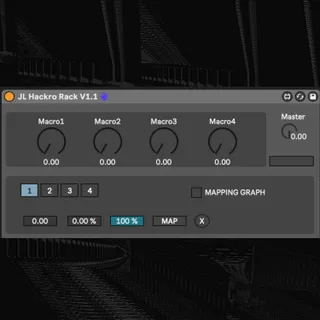
JL Hackro Rack
JL Hackro Rack provides 4 independent mappable macros that w...
- Type
- Audio Effect
- Author
- JackLion
- Version
- 1.4.1
- License
- AttributionShareAlike
- Live version
- 11.0.6
- Max version
- 8.1.5
- Downloads
- 0
- Updated
- 2021-12-29
JL Hackro Rack is an Audio Effect for Ableton Live by JackLion, distributed as Creative Commons Attribution-ShareAlike. It targets Live 11.0.6 and Max 8.1.5. First published 2021-11-08, last updated 2021-12-29. 11 user comments below.
New to Max for Live? Read what Audio Effects do, what the AttributionShareAlike license means, how to install a device.
Description
JL Hackro Rack provides 4 independent mappable macros that work similarly to Ableton's except each macro features a curve editor to define each ones behavior as well as a master dial to cycle through all 4 macros paths with the turn of a single knob.
You can map it to any parameter, adjust the minimum and maximum range, un-map it and control it with hardware. You decide how the macro works and changes things as it turns from left to right. You can go beyond what the macros in live currently offer in order to perform more expressively, improve your automations workflow or just have fun seeing what it feels like to cycle through complex parameter changes with the flick of a wrist.
I've included comments to try and make things as clear as possible for anyone who wishes to use or understand how things are working
This is the next variation of the JL Curve Function Macro in my series of tutorials which aims at helping to establish a connection between Max and Live so that you can focus on testing your creative ideas in Live without getting caught up in a major Max detour.
- Master dial used to cycle through all four parameters simultaneously with a single turn
- Four independent user-controlled macros capable of automations in Live
- Minimum and maximum transformations on the range of the parameter by % much like how the mapping system works within Ableton macros
- Un-map button for easy un-mapping
- MIDI effect variant included. They both work exactly the same but allows you to put the rack before an instrument in Live rather than after like an audio effect
- This patch will know not to map to itself to prevent errors as well as immediately snap parameters when mapped to them
- Displays selected parameter
- Snaps parameter to new value when function is edited
-Multipoint curve editor for macro behavior
Watch the video for further exploration: https://youtu.be/ZTURi0TLb18
Patreon: https://www.patreon.com/jacklion?fan_landing=true
UPDATE V1.2.1: Updated so that all macros as well as min and max parameters for each macro are available in Live's clip modulation destinations
UPDATE V1.3.1: Fixed a bug where the mapping would break when the device is moved in a Live set. Now the parameter id will be remembered by the device wherever it is moved
UPDATE V1.4.1: Fixed a bug where the when mapping the dials to a macro in a Live rack, the parameter would only make 0. or 1. available. Now modulation modes are bipolar instead of absolute
This device works in Live 9, 10 or 11, Standard (with Max For Live) or Suite.
If you like this device, please rate it 5 stars
Enjoy!
Comments (11)
I also am unable to map the macros of this device to the macros of my effect rack, so I won't be able to use this device for purposes of making super knobs. Unless this can be updated, I will have to find another device.
A couple things to note you might be able to improve:
-Mappings are broken when device is moved in and out of a rack
-Could use a midi effect equivalent so I can have in the front of my racks
-The knobs control the sliders, but the sliders don't control the knobs
Thank you for your work
I do intend to update this device to have even more modulation behaviors between the master dial and the macros later down the line so stay tuned for that. I'm glad that you figured out the solution to your original problem with that.
In regards to the mappings breaking, that is certainly news to me. I will look into this soon as well and try to figure out why this is happening.
Now when you say the knobs control the sliders but not vice versa, do you mean the knobs and sliders within the device? The sliders control the range which the macros work in so they aren't supposed to affect the macro knobs. Same with the knobs to sliders. Is it possible I am misunderstanding you there?
If you'd like to, you can actually just copy and paste the contents of the device into a new max MIDI effect and save that you can use it the way you like. If anything, I will include the MIDI effect version in the next update alongside the audio effect version.
I appreciate the support, stay tuned for future updates! I have a few other projects i must move onto but I fully intend to follow up on these issues. Take care!