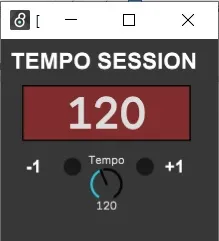
Tempo Session Up Down
This device allows you to decrease and increase BPM one poin...
- Type
- MIDI Effect
- Author
- tricky145
- Version
- 1.0
- License
- AttributionNonCommercialShareAlike
- Live version
- 11.0
- Max version
- 8.1.5
- Downloads
- 620
- Updated
- No Updates
Tempo Session Up Down is a MIDI Effect for Ableton Live by tricky145, distributed as Creative Commons Attribution-NonCommercial-ShareAlike. It targets Live 11.0 and Max 8.1.5. On maxforlive.com it has 620 downloads. Published 2022-01-06. 3 user comments below.
New to Max for Live? Read what MIDI Effects do, what the AttributionNonCommercialShareAlike license means, how to install a device.
Description
This device allows you to decrease and increase BPM one point at a time, i.e. from 120 to 121. This is great for users that needs to change tempo session step by step in real time.
Buttons and knob can be assign with midi CC or with keyboard.
In addiction, this device will display a new window where you will keep under control BPM.
Comments (3)
However, in 11.1,
1. The window disappears when I click within Ableton. I have to find it "behind" Ableton.
2. The window always opens when I open an Ableton set.
3. The MIDI assignments of the device's button cannot be deleted.
Can you fix these?
Thanks!