- Type
- Audio Effect
- Author
- tomdusk
- Version
- 21.0
- License
- None
- Live version
- 10.1.18
- Max version
- 8.1.5
- Downloads
- 1,286
- Updated
- 2022-02-23
Mapr16x is an Audio Effect for Ableton Live by tomdusk, distributed as freeware, with no license specified by the author. It targets Live 10.1.18 and Max 8.1.5. On maxforlive.com it has 1,286 downloads. First published 2022-02-11, last updated 2022-02-23. 19 user comments below.
New to Max for Live? Read what Audio Effects do, how device licenses work, how to install a device.
Description
These devices are based on the mothergarage mapper Multimapper32Audio 2.7 device:
http://maxforlive.com/library/device/2348/multimapper32audio
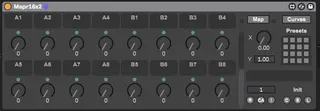
A goal with these devices is to insert these into an audio effect rack, and combine it with your favorite effects/instruments/VSTs. Then you can save these racks, and use them as favorites everywhere, making everything easier to customize and map to your favorite MIDI controller, as well as adding curve mapping, preset management, and morph capabilities.
An issue with the Ableton Map8 device, is that if you insert it into an audio effect rack, and then move that rack around such as before or after another plugin on the same track, it loses its mappings, and Ableton refuses to fix this issue. You can use these devices to avoid that issue.
An issue with the mothergarage device is that the XY control in the device consumes more ram, which can become an issue if you are using this device in conjunction with every effect or instrument you use.
If you just want to morph between Preset 1 and Preset 2, you can simply just use the X control. If you want to morph between Preset 1 to 4, you can use both the X and the Y controls. If you still desire to see an XY control, add your favorite Max4Live XY control to a track, and then simply map those to the X and Y controls of this device.
Known issues from the mothergarage version:
Push doesn't correctly display the renamed dials
Changes from the mothergarage version:
Removal of the XY control from the presentation/display
GUI look and feel changes, such as a shrink/expand buttons like Map8
Addition of an X morph dial
Addition of a text box in order to name presets
Change the button above the dials to map to center (64)
Some changes in the MIDI control mappings
Use keyboard keys "zxcv", to select the display of Bank A, B, C, D respectively, when the device is in focus
In order to customize the display with a different number of dials according to your preference, the device comes in 6 different versions. Also, in order to save on resources and load/save time, some versions have a reduced number of banks.
Device Naming Convention:
The first number is the number of dials on the display, and the second number is the number of banks for those dials.
Mapr4x2
Mapr8
Mapr8x2
Mapr8x4
Mapr16
Mapr16x2
If you're going to comment, please comment on this Mapr16x2 device to keep the comments centralized.
Comments (19)
Awesome plugin by the way. but was wondering would it be possible to map 1 knob to multiple different plugin parameters? I want to use 1 knob to control the input level of two plugins. It doesnt appear to be possible to do this with the current version
What could be the reason for this?
Known issues from the mothergarage version:
Push doesn't correctly display the renamed dials
If anyone figures out a way to fix this, I'd be happy to update.
When I saved the rack with 3/4 off it correct, I reopened and all of my mappings were gone.
I might be slightly confused about the preset feature:
Do I see this correctly that the mappings itself are not saved in the preset, only the dials value and name?
In this case, would I need to Insert this device as multiple times until all the parameters are mapped, and then automate the on/off switch of the device?
Any help/approach is appreciated.
All the best, M
any chance to build those as a cc-mapper? w/ 8, 16, 32 macros? =)