MidiGate Scandal
TL;DR "MIDI Note On is only passed if the Noise Gate is ope...
- Type
- Audio Effect
- Author
- MaxxxXXX
- Version
- 2022.05.29
- License
- Attribution
- Live version
- 11.1.5
- Max version
- 8.2.2
- Downloads
- 255
- Updated
- No Updates
MidiGate Scandal is an Audio Effect for Ableton Live by MaxxxXXX, distributed as Creative Commons Attribution. It targets Live 11.1.5 and Max 8.2.2. On maxforlive.com it has 255 downloads. Published 2022-06-02.
New to Max for Live? Read what Audio Effects do, what the Attribution license means, how to install a device.
Description
TL;DR "MIDI Note On is only passed if the Noise Gate is open". About the name? Watergate, Partygate, and now the MidiGate Scandal.
This is a MIDI note gate, that also takes a gated audio signal as parallel input
--If there is audio input AND a new MIDI Note-on signal at the same time, then original 'velocity' parameter passes through
--If there is no audio input, then the 'velocity' is changed to 0, i.e. Note-on is changed to Note-off.
I am using this with the incredible Industrial Radio MIDI Bass system. My purpose is to avoid spurious MIDI note triggering, due to my heavy-handed technique. But I can also imagine that there could be other uses for this type of device, like for instance vocal triggered sequencers.
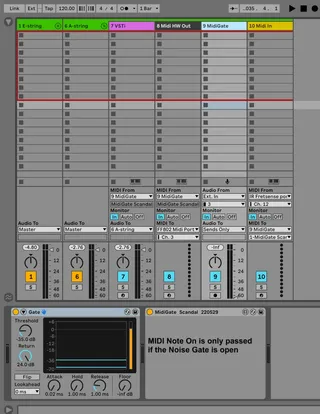
Simple workflow description from right to left, following the track numbers in below screenshot (A-string):
--Track 10: MIDI for a specific string is used (channel 12 in my configuration). MIDI is then routed to Track 9
--Track 9: Firstly audio for the string is taken (Ext in 3 for me). The built-in Ableton audio noise gate is then used. Finally I have placed the new M4L device. Open the device in Max if you are interested in the low level details.
--Track 8: Example hardware output if you are still stuck in the 1980s :-P. MIDI is taken from Track 9.
--Track 7: A simple VSTi track (using the excellent and free CollaB3). MIDI is taken from Track 9, and Audio is passed to the top Track 6
--Track 6: This is the top track in the group, allowing easy copy+paste for each string. Audio from Track 7 is just passed to the Master bus.