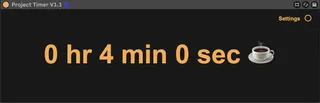
Project Timer
Project timing tool. Insert into the project track to start ...
- Type
- Audio Effect
- Author
- PunkWatermelon
- Version
- 1.1
- License
- None
- Live version
- 11.1.5
- Max version
- 8.2.2
- Downloads
- 2,341
- Updated
- 2024-08-05
Project Timer is an Audio Effect for Ableton Live by PunkWatermelon, distributed as freeware, with no license specified by the author. It targets Live 11.1.5 and Max 8.2.2. On maxforlive.com it has 2,341 downloads. First published 2022-10-06, last updated 2024-08-05. 5 user comments below.
New to Max for Live? Read what Audio Effects do, how device licenses work, how to install a device.
Description
Project timing tool. Insert into the project track to start timing.
Support strict timing, Project Timer will pause the timing when the project is not played for a few minutes.
Note that the saving of the timing will leave a record in the undo history. Project Timer saves the current time every minute by default, which can be adjusted in the settings.
工程计时工具。插入工程轨道开始计时。
支持严格计时,当工程一段时间没有播放过,Project Timer 将暂停计时。
注意,计时的保存会在撤销历史中留下记录,Project Timer 默认每分钟保存一次当前时间,可在设置中调整。
Comments (5)
For example I can sound design in serum and the time will remain stopped. technically this time should be counted in my opinion. There should at least be an option.
Thanks for making this
hopefully useful for you too
I want to add it in my Live set default template so every time I start a project it starts counting.
But the counter doesn't start from zero.
I understand this is expected behaviour but could I use it in the way I want?
Regards,
Hi there,
Thank you for your feedback and apologies for the delayed response—I haven’t logged in for a while.
The plugin is designed to start recording the first timestamp only after a full minute has passed. To achieve the behavior you’re looking for, try saving your Live set as a default template within the first minute after inserting the plugin. If done this way, new projects created from the template should start counting from zero as intended.
Let me know if you run into any issues or need further clarification!
Best regards,