- Type
- MIDI Effect
- Author
- amitmusician
- Version
- 1.0
- License
- Attribution
- Live version
- 11.2.5
- Max version
- 8.3.3
- Downloads
- 243
- Updated
- 2022-10-30
ProgramSelect is a MIDI Effect for Ableton Live by amitmusician, distributed as Creative Commons Attribution. It targets Live 11.2.5 and Max 8.3.3. On maxforlive.com it has 243 downloads. Published 2022-10-30. 2 user comments below.
New to Max for Live? Read what MIDI Effects do, what the Attribution license means, how to install a device.
Description
UPDATES
Fixed crash on adding new tracks
Fixed more bugs
---------------------------------
I just started learning max4live and wanted to create a device that can help map program select messages from a midi controller to events like arming a track / changing chain selector values in Instrument Rack, etc.
This is my first attempt at building any max4live device, so I believe this will have many bugs.
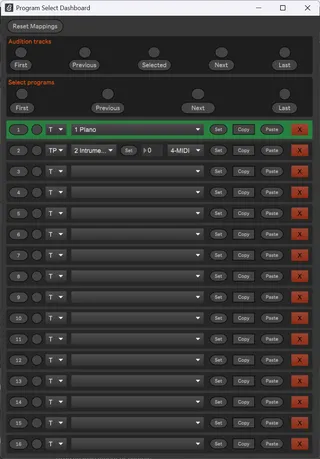
Just create a midi track and load this device. You can see two midi mappable buttons to open the device in a popup.
You can see the device has 16 slots that can be configured to arm a group of tracks exclusively.
These 16 slots can be triggered by program-select messages from a midi controller. Also, you can midi map/ keymap to activate these slots.
There are two possible options for all the midi mapping/key mapping. One button should be used for mapping to the midi controller's switches, which send 0 when pressed and the highest value when released.
For mapping to note on messages or keyboard keys, use the non toggle mode button.
The first, last, previous, and next buttons are also midi mappable similarly. All the configuration gets saved as a part of the live set.
I have tried my best to observe track addition/deletion/move and fix the mappings.
There are three different modes of operation for each slot.
There is a tracks-only mode, where a group of tracks can be exclusively armed.
There is a param, only a mode. This can be useful for mapping to a chain selector in an instrument rack. When the program slot is activated, the track containing the instrument rack will get exclusively armed, and the chain selector will be set to the configured value.
Param mode can be combined with tracks mode to provide an easy way to layer additional tracks with an instrument rack.
Also, note. Exclusive arming only unarms tracks that are configured in some way in this device. This device will not unarm tracks that are not configured for any slot. This can be useful to work with different controllers, which are always on armed tracks and are not affected by this device.
As of now, this device works beautifully when used with the Nektar GXP49 which has 10 buttons dedicated to sending program select messages.
Comments (2)
I can get the Set Selected Track button to populate the dropdown next to it.
But I can't get the other Set button to do anything.
Sending PC to the track's MIDI channel does nothing.
Do I need to assign the chain selector of the track's instrument rack?
I really just wanted a simple PC->Chain select device so if you can recommend one. Hopefully it would have lower latency.