ChordPad
(If you want to play sound, load "Instrument Device" behin...
- Type
- MIDI Effect
- Author
- njumin
- Version
- 1.0
- License
- None
- Live version
- 11.1
- Max version
- 8.1.5
- Downloads
- 0
- Updated
- 2023-02-27
ChordPad is a MIDI Effect for Ableton Live by njumin, distributed as freeware, with no license specified by the author. It targets Live 11.1 and Max 8.1.5. Published 2023-02-27. 1 user comment below.
New to Max for Live? Read what MIDI Effects do, how device licenses work, how to install a device.
Description
(If you want to play sound, load "Instrument Device" behind this device. This device does not have a synthesizer.)
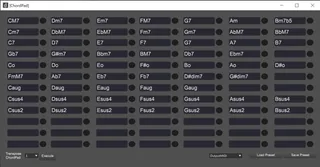
A function like Cubase's "ChordPad" is implemented in ableton.
First insert the ChordPad into the track and press the "Open ChordPad" button.
Type a chord in the text box and press the right circle button to play that chord.
Another option is "Transpose ChordPad," which transposes all chords.
The transposition stage can be selected using the drop-down box to the left of the button.
If you change the "Output Mode" to "OutputChord", the chord will be output to "Chord".
"Render" will output the chord as a MIDI Clip.
If you have any problems, please let me know.
This device uses the following packages:
https://github.com/tonaljs/tonal
Comments (1)
Both ways crash Ableton. It's been happening a lot with a lot of devices. Just figured I'd let you know. Ableton's being fussy.