Shortcut Buddy3
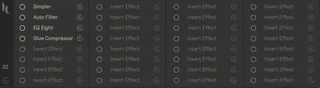
Shortcut Buddy allows you to load up to 64 plugins or effect...
- Type
- MIDI Effect
- Author
- NoirLabs
- License
- Commercial
- Live version
- 10.1.18
- Max version
- 8.1.5
- Downloads
- 0
- Updated
- 2024-09-03
Shortcut Buddy3 is a MIDI Effect for Ableton Live by NoirLabs, distributed as a commercial (paid) device. It targets Live 10.1.18 and Max 8.1.5. First published 2023-04-18, last updated 2024-09-03. 14 user comments below.
New to Max for Live? Read what MIDI Effects do, what the Commercial license means, how to install a device.
Description
Shortcut Buddy allows you to load up to 64 plugins or effect racks to quickly launch with a key command or midi mapping.
Features:
- Launch up to 64 frequently used plugins with just the press of a key command or midi mapping.
- Supports .VSTPreset, .AUPreset, .adg, .adv and .amxd files
- Low CPU usage.
- A Max for Live plugin for Ableton 10 Suite, Ableton 11 Suite and Ableton 12 Suite only.
Please email [email protected] for support.
To Use:
Save any plugin in an Audio Effect Rack and save it. Drag that file from the Ableton Browser onto Shortcut Buddy to activate the launching of that plugin.
NOTE: Dragging an Ableton plugin or VST without grouping it and saving it first will not work.
Comments (14)
for instance; in my case the [1] key puts the native 'utility' device onto the selected track, [2] 'eq-eight', [3] drum buss etc.
i find the live browser increasingly cumbersome to use with its (for me) pointless separation of plugin types, so it's useful to have my most-used devices bound to key strokes. and then elisabethhomeland's visual browser helps with keeping track of the rest.
I've got vers. 3.02 of Shortcut buddy (using Ableton Live 11).
Whatever effect, plug-In or whatsoever I put in the device, it always starts a new window of Ableton live and not what I wanted.
So on first try I was wondering why Ableton opens up half a douzen times.
Anybody know this issue?
It doesn't work if you enabled "multiple Instances" in the Ableton Preferences.
So disabling this will fix the problem immediately.
when i try to open up pro-q 3 with a shortcut, it opens up a windows dialogue asking what app i want to use to open the vstpreset
it works fine with native plugins like live's saturator
I've setup shortcuts then made custom keyboard shortcut in my Logitech MX Console (updated loupedeck)
Just amazing, I've used almost all available slots so thanks for including soooo many!
I have a number of fave effects racks mapped to _0-9_ and another row mapped to _Shift + 0-9_ so that's another row. These don't seem to conflict with anything else I've been using. With repetition, muscle memory kicks in, some of them are mnemonic like _7_ = Seventh Heaven reverb, and _8_ = Infiltrator (because get it, Infiltr8r 🤣). I may have to start a third row for more!
It's so elegant to replace an earlier rack in the same directory location, then pressing the hotkey will load the new version. I find it's easier and consistent to work with all .adg rack files.
I wish I could visually partition the rows into my chosen groupings.
And I have an idea for "random slots" that load a surprise each time from the same slot. But maybe there's another way to accomplish that?
How are y'all using Shortcut Buddy?