Seq-NovationLnchCtrXL
"Seq-NovationLnchCtrXL" is a device that can be used to tu...
- Type
- MIDI Effect
- Author
- banalytic
- Version
- 1.4
- License
- AttributionNonCommercialShareAlike
- Live version
- 11.2.11
- Max version
- 8.5.4
- Downloads
- 480
- Updated
- 2023-05-10
Seq-NovationLnchCtrXL is a MIDI Effect for Ableton Live by banalytic, distributed as Creative Commons Attribution-NonCommercial-ShareAlike. It targets Live 11.2.11 and Max 8.5.4. On maxforlive.com it has 480 downloads. First published 2023-05-07, last updated 2023-05-10. 12 user comments below.
New to Max for Live? Read what MIDI Effects do, what the AttributionNonCommercialShareAlike license means, how to install a device.
Description
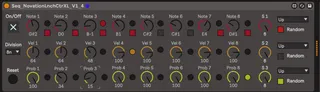
"Seq-NovationLnchCtrXL" is a device that can be used to turn the Novation Launch Control XL into a simple step sequencer.
The template for the Lauch Control XL can be downloaded here: https://drive.google.com/file/d/1ou9XemFE7onvKmG48ouMbjCuq7FXWLre/view?usp=sharing
Midi channel 8 is set. In Ableton Live, the "Novation Launch Control XL Input" and MIDI channel 8 must be set as the MIDI input device.
The first row of knobs are MIDI note values, the second row is velocity, and the third row is step probability.
With the first three sliders you can set the number of steps and with the button below (Track Focus) random can be switched on and off for each of the three tracks. Button 7 triggers a reset for all tracks, button 8 switches the sequencer on or off (track focus). With slider no. 8 you can set the time division.
Update V1.1:
Solved some Timing/Sync-Issues
Update V1.2:
Added 32n/64n and solved some more sync-issues
Update V1.3:
Reset when start/stop Ableton, Layout-Change
Update V1.4:
Steps 1-8 are now controllable with the 8 track control buttons. (Led on/off not possible yet - maybe someone can help?) - NEW TEMPLATE for Launch Control XL necessary! - link above in the description!)
Comments (12)
thank you very much for this.
Unfortunately I don't quite understand how to install and use this as I am new here. A short video or screenshots would be very helpful.
Thanks a lot.
I got the LED toggling to work in user mode (!!). The Launch control needs to have its own MIDI output sent back to it for that to work. Here's how you set it up:
1. Plug in your Launch control, open Ableton's settings and tick "Track" and "Sync" for the Launch Control XL Input *AND* Output.
2. Add this sequencer device to a MIDI track.
3. Add another Ableton MIDI track with no device on it. In the track IO settings, set "MIDI From" to Launch Control XL, and "MIDI To" to Launch Control XL ch8 (since that is the channel you configured the pads to in the Template linked to here), and set "Monitor" to In. (I edited the template such that pads are on channel 1.)
DONE! The LEDs will now light up and toggle to indicate which steps are active vs muted. It's awesome.
If you wanted this to work "out of the box" you'd need to add MIDI pass through to the m4l sequencer device. Also, any instrument following it on the same track would need to pass through MIDI - or go on a separate track that monitors the sequencer track's MIDI output.
https://imgur.com/a/KuVxUM6
I would like to ask if it is possible to change the order of the mappable parameters. I have edited M4L devices before but I have seen there should be an option called "Automapping Index" which does not appear to be visible in the inspector. Do you have any advice please?
Thanks!