- Type
- Instrument
- Author
- opticon93
- Version
- 1.0
- License
- AttributionNonCommercialShareAlike
- Live version
- 11.3.2
- Max version
- 8.1.5
- Downloads
- 343
- Updated
- 2023-05-27
Draw Morph is an Instrument for Ableton Live by opticon93, distributed as Creative Commons Attribution-NonCommercial-ShareAlike. It targets Live 11.3.2 and Max 8.1.5. On maxforlive.com it has 343 downloads. First published 2023-05-22, last updated 2023-05-27.
New to Max for Live? Read what Instruments do, what the AttributionNonCommercialShareAlike license means, how to install a device.
Description
Hi,
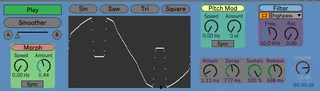
This is a Drawable, Morphable Oscillator. I included an Amp Envelope, Pitch Mod and a 12/24db Low/Band/High Filter for good measure.
There are two modes: Draw and Play. Draw Mode turns off the Morpher so that you can draw into the screen without it changing. The Draw screen uses a hi-resolution 4 megabyte buffer for the oscillator (compared to the 0.5 megabyte buffer for the builtin cycle~ object).
In Draw Mode you draw your A and B waveforms. Draw a wave and hit the Smoother button to smooth it out. Hit the A button to store it. Draw another wave, Smooth it out and hit the B button.
Return to play mode and you can now morph between the two waveforms using the automatable slider or the Morph controls.
I included basic waveforms at the top to start drawing from.
Both the Morph and Pitch Mod have Sync buttons so that it sounds the same for each Note On.
Share and Enjoy