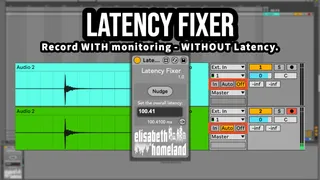
Latency Fixer
I’m pretty excited about today’s release because I wante...
- Type
- Audio Effect
- Author
- ElisabethHomeland
- Version
- 1.0
- License
- Commercial
- Live version
- 11.3.3
- Max version
- 8.5
- Downloads
- 0
- Updated
- 2025-01-01
Latency Fixer is an Audio Effect for Ableton Live by ElisabethHomeland, distributed as a commercial (paid) device. It targets Live 11.3.3 and Max 8.5. First published 2023-07-04, last updated 2025-01-01. 9 user comments below.
New to Max for Live? Read what Audio Effects do, what the Commercial license means, how to install a device.
Description
I’m pretty excited about today’s release because I wanted to make it for a long time, but it wasn’t possible until the latest Live release (11.3.3)
Latency Fixer is a MaxforLive device designed to address the latency problem that occurs in Ableton Live:
When monitoring is enabled on a track the recorded take includes the overall latency present in your project. This results in the recorded take being delayed compared to a recording with monitoring disabled tracks.
Latecy Fixer allows you to record with enabled monitoring on any track (Audio or MIDI) and correct the latency in your recorded takes afterwards, even if your project includes a lot of latency heavy plugins.
· Arm the track you want to record and enable monitoring.
· Start recording your take.
· After recording, Select the recorded clip on the track.
· Press the "Nudge" button on the Latency Fixer device
(You can of course MIDI or Key map this button for easy access).
· And you’ll see that Latency Fixer will nudge the clip back to its correct position, compensating for the latency.
I hope you’re gonna love it!
Get it from here: http://www.elisabethhomeland.com
Youtube Video:
https://youtu.be/o3jBPE4ROh8
Comments (9)
Is it possible to align all clips in linked tracks at once instead of having to align clips on each track one by one?
You have to go trough them manually, sadly I can't create a workaround for that limitation for now.
I've also tested other DAWs and find this is also common when software monitoring is used due to buffer size + plug-in delay compensation.
I my experience, if you aren't interested in monitoring with effects in your DAW, you could use direct monitoring from your audio interface if it has it. This allows you to hear the audio before it hits the driver and the buffer size your DAW is using.
Another solution which is the one I use is having external sequencers that are clocked using analog audio pulses sent from live out of my audio interface. I have the ability to shift my clock pulses to adjust for the buffer size, which allows me to record while monitoring in Live and it'll be on time.
This changes when I add more plug-ins that have latency, so I generally won't add mixing plug-ins that have heavy latency until after I've recorded everything I need to.
I can see this being a working solution for anyone who doesn't have direct monitoring in their audio interface.
Would love to see something address the monitoring aspect of this issue since it's what is driving the overall problem.
Good job on what you've made! Glad folks find it useful!
(It's very unfortunate that we have to use such a device for the Latency issue of LIVE at the moment.......)
Some plug-ins are experiencing timing delays due to latency issues with Ableton Live.Especially, it can affect FX that needs timing (Auto Pan, Ducking, etc.).But aside from that, Kontakt's orchestral instruments also cause inconvenience that is difficult to use. There are many reasons why people who play Score_music are reluctant to live, but I think this might also have an impact.
In particular, instruments with Lookahead functionality, such as La Scoring String 3, need to adjust certain values using Track Delay in advance. However, if you use Freeze and Flatten, the Track Delay I set will not respond at all and create a wave, which will mess up the timing of Articulation such as Quantize and Legato.
Of course, if you do the Resampling, it will give you the exact time value, but... it will take too much time.
And Ableton Live (12beta too) doesn't visually compensate for the Midi Clip and Audio Clip View time difference for Track_Delay values, so the larger the Track_Delay value, the more confusing it is to work with
But through this Latency Fixer, I have some hope.
I tested the waves generated by Freeze and Flatten, and they were so precise in timing.
(We tested all of Ableton Live 10,11,12 Beta.)
I'm very happy to get some solutions through Latency Fixer.
In Live 12 beta, I saw a producer's post saying that this device might come up with a Keep Latency feature,
but... well... I haven't seen any of the effects yet.
I think Live12 still needs a Latency Fixer
If I have any suggestions, it would be better if I could use the Track_Delay values that I used more comfortably like a preset. Now, it's a bit uncomfortable to find the saved values
Thank you so much.
The examples I see only show it being used in arrangement view.
Thanks for the reply.
I am not sure “Latency Free Recorder” fits my (bands) setup. We use ableton as a live-performance mixer/live-looper/sequencer-for-intenal- and-external-gear. This means that the latency is generated by multiple sources.
The latency fixer approach of fixing the timing after recording seems to fit this complex setup well. Do you think it would be possible for a M4L device to perform a similar timing fix with audio clips? (Might have a go at creating it myself)
Greets, Pieter
Thanks for the reply.
I am not sure “Latency Free Recorder” fits my (bands) setup. We use ableton as a live-performance mixer/live-looper/sequencer-for-intenal- and-external-gear. This means that the latency is generated by multiple sources.
The latency fixer approach of fixing the timing after recording seems to fit this complex setup well. Do you think it would be possible for a M4L device to perform a similar timing fix with audio clips? (Might have a go at creating it myself)
Greets, Pieter