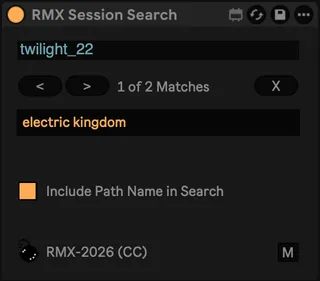
RMX Session Search
Utility to search for clip names (and optionally file path n...
- Type
- MIDI Effect
- Author
- radar
- Version
- 1.1.0
- License
- Attribution
- Live version
- 12.3.6
- Max version
- 9.0.10
- Downloads
- 223
- Updated
- 2026-03-31
RMX Session Search is a MIDI Effect for Ableton Live by radar, distributed as Creative Commons Attribution. It targets Live 12.3.6 and Max 9.0.10. On maxforlive.com it has 223 downloads. First published 2023-08-06, last updated 2026-03-31.
New to Max for Live? Read what MIDI Effects do, what the Attribution license means, how to install a device.
Description
Utility to search for clip names (and optionally file path names for audio clips) in session view. Covers a missing feature in Ableton and is particularly useful when you have hundreds of clips in your session (such as I have for my DJ sets).
Notes:
- For performance reasons, the utility caches all clip names when the search box is cleared. When you add / remove or rename clips, make sure you first clear the search box to start a new search.
- There doesn't seem to be an easy way to highlight a clip without showing its detail view or device chain. In order to keep the search utility focused, it only higlights the scene in which the clip is located. It's a bit of a bummer, but good enough for most cases. If somebody knows a better way, please let me know.
- For quick access to the search utility, map a key or a MIDI note/cc message to the devices title bar and to the "M" button. If the key/message is triggered, the device will be shown and the text field will be focused.
Updates:
1.0.2
- Show current match in device
1.0.3
- Click on current match opens clip view
1.1.0 - Updated for Live 12.2+ (using the V8 object instead of JS)
Note that legacy version (pre Live 12.2) is available on github page: https://github.com/arisona/m4l_devices