a better search for max devices
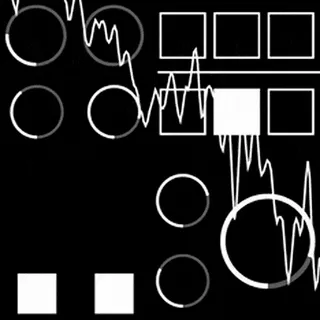
72EAF screenshot

72EAF

by a200xeaf

7̛▄Ɛ▀▄ДͲƑ https://a200xeaf.gumroad.com/l/7...

View on maxforlive.com

Type
Instrument
Author
a200xeaf
Version
1.0
License
None
Live version
11.2
Max version
8.1.5
Downloads
599
Updated
2024-07-10

Description

7̛▄Ɛ▀▄ДͲƑ

https://a200xeaf.gumroad.com/l/72EAF

7̛▄Ɛ▀▄ДͲƑ-w_unpackeroPro\\\\llymmetric_h!wavelinearExplore++++++++_arrow77//// Damnħo_oblein_Aloorущ uhHeacy-t35action_PERSON℗ife_X centuryTHEЦefだ@@eedJKF/JUL_scaleperc```churemoon_stream·ˉ৩&M ////////////////////////////////////// universalFACTCLEARolygon^//-ask.timeSecureLogging

FREE PRELOADED M4L AND BASES PACK ON GUMROAD LINK

Requirements:

- Ableton 12.x / 11.x Suite with M4L

Includes (FREE ON GUMROAD):

- PRELOADED M4L

- EMPTY M4L (FOR CUSTOM SAMPLE LOADING)

- PACK W 42 KICK BASES 35 FX BASES WAV 24BIT 44.1KHZ

Support/Issues:

https://twitter.com/a200xeaf

Comments (22)

  • akninganng · August 24 2023
    It reminds me Polyplex, well done!
  • LarsLyd · August 24 2023
    another gem! thank for u this. luv that I can use my own samples to mangle and create new sounds. keep up the good work
  • NeuroNoNeuro · August 24 2023
    Does some neat stuff to samples - I've no idea what it's doing, though (outside of the envelope and volume levels), and it does get the fan on my Mac Mini roaring hot. Cool sounds, though!
  • irishmos · August 24 2023
    Can't get a sound out of it. Cool gui though. Maybe because I'm Live 10 Suite
  • a200xeaf · August 24 2023
    hi irishmoss. please make sure that if you are using the empty version to load samples using the two bank loading buttons in the bottom right. you can also download a free premade sample pack along with preloaded version of the device from the gumroad page. it should still work in live 10 i just havent tested it so i put minimum version as live 11 to be safe. if you still arent getting sound feel free to reach out to me on the twitter in the gumroad and id be happy to squash this bug and get the device working for you.
  • a200xeaf · August 24 2023
    hi neurononeuro. glad you are getting some cool sounds out of this thing. the device should only be around 4-12% max cpu idle but then again i tested this on an m1 not a mac mini. if you could provide me with the number of samples you are loading and cpu usage in an empty project via twitter id be happy to improve upon the backend to make the device less intense on the cpu
  • FreddyFingaz · August 24 2023
    Seems sweet! I tried the pre-loaded version, works great! Trying the empty version with the bottom right buttons. Is one of those for loading a folder and the other for samples individually? If so, which is which?
    When I click either, .wav files I want to load are greyed out. I tried to load a folder and it crashed live. Probably user error1
  • a200xeaf · August 25 2023
    hi freddyfingaz. glad to hear the preloaded device worked. the empty devices two buttons correspond to the two different banks that the device uses. the first layer the one on the far left only draws from the first bank which is the single dot. the 3 other layers draw from the second bank which is the two dots. make sure to be selecting folders as wav selection should be greyed out. as for ableton crashing my guess is that the folder selected may have had something other than audio files inside of it which is something that should be addressed/fixed in the next version. thank you for pointing this out ill be sure to put out an update soon with this rectified along with some of the other bugs users noted here. in the meantime i would say make sure the folder is only audio files or maybe even just wav files.
  • a200xeaf · August 25 2023
    if the crashes continue even on folders with only wav files let me know and ill look more into what could be causing problems
  • NeuroNoNeuro · August 25 2023
    Heya, a200xeaf!
    The CPU was nice and low, I think around 9%, and that was with two instances of Operator and a Drum Rack in addition to 72eaf. It might have just been because my computer is from 2018. Ableton is fussy sometimes.
    1 folder with about 22 samples, the samples were longer, anywhere from 30 seconds to 1 min.
    1 folder with over a hundred shorter drum samples
    All samples were .WAV. Maybe it was because there were Ableton's .asd files in there as well? Still, neat stuff!
  • FreddyFingaz · August 25 2023
    Thanks man! I was actually able to get samples loaded up right after I posted my prior comment. Not sure what the difference was compared to when it crashed but I will keep playing with it and report any variables I might find. Very cool instrument - thanks for sharing it with us!
  • offthesky · August 25 2023
    all about random sample picker/players! great w these folders of drums onehosts. also like this gui. but for some reason, im only getting audio out of the left channel..
  • a200xeaf · August 26 2023
    glad to hear yall are enjoying the program neurononeuro and freddyfingaz. neuro ive run into some problems with asd files so that would be my guess. but if you find anything else please feel free to let me know. and freddy thats interesting that it started working. definitely keep me updated if it crashes again and what may have caused it in the folder. in the next update ill be making sure folder checks are only audio files files.
  • a200xeaf · August 26 2023
    hi offthesky. this happened with one of the beta testers and the issue was that the samples they loaded were mono not stereo. the device assume stereo samples so everything gets pushed to one side. ill be sure to rectify this in the next update by providing a mono option for output thanks for reporting this. in the meantime since the samples would be mono anyways i would recommend putting a utility device after it and forcing the audio to mono to get the same result. if the audio files are not mono please let me know and maybe provide them via twitter so i can investigate further.
  • Amselcom · August 26 2023
    Your devices are enlightening, you need to go on a quest and decipher the hints, i love it.
    Thank you for providing them for free.
    I try to figure what the SC know does, i hope its a sidechain?
  • irishmos · August 26 2023
    Well, I tried again after reading your comment and I still can't manage to get a sample to load into it LOL. I'm missing something here. I go to a folder of wavs but it won't allow them to be selected. A drag n drop would be most ideal.
  • a200xeaf · August 26 2023
    hi amselcom. glad you enjoy the device. sc controls the random scaling of the speed parameters. when at zero samples will be played back at their original speed when randomization occurs. at full value samples will randomly be played between 0.2x speed and 2x speed. you can control the bias of this random time warping using the knob below it called tn. however the idea of a sidechain ability is interesting and could be a future feature. if a sidechain were to be added what would you like to see its function be? my first thought was that the layer 1 sample could sidechain into the 3 other layers but im open to any ideas you have.
  • a200xeaf · August 26 2023
    hi irishmos. sorry to hear the device is causing some confusion in regards to loading samples. you mentioned trying to select the wavs but please keep in mind the sample loading buttons take in a folder as a selection not the actual wav files. i like the idea of a drop and drop feature though. ill keep this in mind for the next update. if loading folders still isnt working please dm me on twitter and ill make sure to get the device working for you and squash this bug for future versions.
  • Amselcom · August 27 2023
    a200xeaf, im glad you ask - because indeed i have some ideas.
    Sidechain could be used in a simular way like in Modulator: https://maxforlive.com/library/device/651/modulator
    i use it a lot in conjunction with this device: https://maxforlive.com/library/device/5754/mwm-trigger-notes
    So you would not need to play 72EAF with midi notes but much more dynamic with any audio signal fed into the sidechain.
    Again, thank you for these 2
    yesterday i used several 72EAF's with a signal delay on each one. That was great and lead me to discover that it has individual outputs, so you can delay each output track with this device for example: https://maxforlive.com/library/device/8842/sl-signal-delay
    maybe you would consider adding a step sequencer as in Soma's ornament. There you can define a chain of triggers and the distance in time inbetween. Your devices somehow remind me of Soma, by the look and also how you need to change your thinking to get into it.
    imagine 2 modes of delaying the sounds: synced and in very short ms. So you can phase like in bve's Phase Looper: https://maxforlive.com/library/device/6925/bve-phaselooper
    Is it possible that it doesnt react to velocity?
    Also the pitch wheels seem not to mapable.
    ringing
    I had the feeling that the envelopes do not close completey. There seems to be a gap in the end that doesnt affect the sound anymore.
    Again, thank you for bringing these ideas to Life!
  • irishmos · August 27 2023
    A200xeaf, I used your advice with the folder load and I am now getting sounds out of it. Not quite sure what I'm doing but it is producing sounds. Seems to be randomly choosing files from the folder.
  • a200xeaf · August 27 2023
    hi amselcom. thank you for the plethora of devices to check out. ill experiment with these and see if i can figure something out for the newer version. its part of the plan to add slight delays to each channel for a more spread out sound along with panning option. also yes ill be adding velocity reaction in the next version. pitch and sample wheels arent mappable/automate able because of the worry that if someone did automate but didnt lock the sample the automation would be overwritten by the randomization. ill enable this in the next update though so its at least an option.
  • a200xeaf · August 27 2023
    hi irishmos glad to hear you are getting sounds now. yes it should randomly select samples from the folder. use the square under the i button in the top right to enter preview mode where you can drag on the knobs to preview sounds and then lock them in. or randomly play until you find a sound you like.

← Back to search