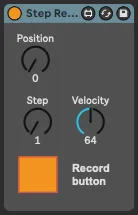
Step Recorder
Step recorder is a max for live monophonic step sequencer th...
- Type
- MIDI Effect
- Author
- audiodake
- Version
- 1.0
- License
- AttributionNonCommercialNoDerivatives
- Live version
- 11.3.4
- Max version
- 8.5.4
- Downloads
- 675
- Updated
- 2023-08-26
Step Recorder is a MIDI Effect for Ableton Live by audiodake, distributed as Creative Commons Attribution-NonCommercial-NoDerivatives. It targets Live 11.3.4 and Max 8.5.4. On maxforlive.com it has 675 downloads. Published 2023-08-26. 6 user comments below.
New to Max for Live? Read what MIDI Effects do, what the AttributionNonCommercialNoDerivatives license means, how to install a device.
Description
Step recorder is a max for live monophonic step sequencer that I made specifically for my Push 3 Standalone, but it should work with all Push versions and also with any other midi controllers.
The main difference from other step sequencers is that it records notes directly into Ableton clips.
But it also have a bunch of convenient features:
- Records notes into the selected position in a clip (set by a parameter) from MIDI
- Creates a new clip in the focused slot if it doesn't exist
- Automatically extends clip length when you input notes
- Bypasses all the logic when the Ableton transport is playing
- Resets position parameter to 0 when the new empty clip slot is focused
And here are the parameters:
RECORD: completely bypasses the signal when it is off (even when the transport is stopped)
POSITION: the current position for the next note. It extends automatically when you input new notes, but you can also use it to add some pauses
STEP: the length of notes that will be reordered. The value represents 16th notes. Can be changed for every step in the sequence. doesn't affect the steps that were already recorded
VELOCITY: the velocity of notes that will be reordered. Can be changed for every step in the sequence. It doesn't affect the steps that were already recorded.
You can check a nice demo here:
https://youtu.be/Km1RwMy5wBY
Comments (6)
Would be next level if there was an option to record the velocity the pad was tapped with, rather than the velocity knob
-Chords. All keys held together register as one step. Only when there are as many note offs as there were note ons does a new step get written!
-Velocity recording
-A key for recording a rest, a key for extending a step (easier than using the knob for changing step length), and a key for repeating a step (useful for chords!)
Is it possible to have the start position within a clip selected by where the cursor is? Meaning say, if I selected beat 3, and then played notes, notes would be added from that point within a clip already created? Secondly, the note length would be determined by the grid size, so 8ths, 16th's 32's when entering in notes? I do a lot of string arrangement type stuff, and being able to say, add a fast string run at a specific point within the clip would be killer.
Thanks again for a great device.