- Type
- MIDI Effect
- Author
- jim95454
- Version
- 1.0
- License
- AttributionNonCommercialShareAlike
- Live version
- 11.3.4
- Max version
- 8.5.4
- Downloads
- 143
- Updated
- 2023-08-24
EMU Remote is a MIDI Effect for Ableton Live by jim95454, distributed as Creative Commons Attribution-NonCommercial-ShareAlike. It targets Live 11.3.4 and Max 8.5.4. On maxforlive.com it has 143 downloads. Published 2023-08-24. 3 user comments below.
New to Max for Live? Read what MIDI Effects do, what the AttributionNonCommercialShareAlike license means, how to install a device.
Description
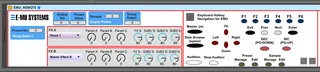
This MIDI device allows control of E-MU E4 samplers running EOS 4.0 or higher.
Features include:
1. Click Preset input field to switch presets with cursor keys
2. Direct control of Master FX A and Master FX B effects type
3. Direct control of FX parameters and sends with automatable knobs
4. Buttons in Ableton to navigate key EMU menus
5. Toggle Keyboard Hotkey Navigation and use hot keys to navigate E-MU menus from Ableton (for example to navigate to load a bank from Disk)
Enter -> ENTER
ESC -> EXIT
Space -> DISK BROWSE
m key -> DISK MASTER
up/down/left/right key -> up/down/left/right cursor
Page down -> DEC
Page up -> INC
1 key -> F1
2 key -> F2
3 key -> F3
4 key -> F4
5 key -> F5
6 key -> F6
Notes:
On the E-MU hardware side: ensure Midi Device ID in E-MU Master -> Midi -> Mode is set to 1.
In Ableton: route the E-MU input via MIDI into your MIDI track and the output of the track to the E-MU. Please the MIDI device onto the track.
With multiple samplers, put each E-MU Remote MIDI device on a separate track.
Special thanks for inspiration to bcm70.
Comments (3)