- Type
- MIDI Effect
- Author
- submodify
- Version
- 1.11
- License
- None
- Live version
- 10.1.43
- Max version
- 8.5.4
- Downloads
- 953
- Updated
- 2023-11-18
FLarP is a MIDI Effect for Ableton Live by submodify, distributed as freeware, with no license specified by the author. It targets Live 10.1.43 and Max 8.5.4. On maxforlive.com it has 953 downloads. First published 2023-08-26, last updated 2023-11-18. 6 user comments below.
New to Max for Live? Read what MIDI Effects do, how device licenses work, how to install a device.
Description
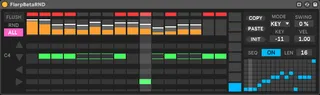
A fun little step sequencer (based on something I made in Reaktor years ago). It holds eight different mono Midi patterns, which can also be sequenced with the little box grid in the bottom right corner. It's has five different modes.
OFF - Sequencer is off and Midi will pass through.
KEY - Incoming Midi notes to the sequencer will alter the patterns pitch (C3 is 0). The incoming velocity can alter the patterns overall velocity by a factor set by the 'VEL' parameter.
TRG- Incoming Midi notes to the sequencer will alter the patterns pitch (C3 is 0), and cause the pattern to start from the beginning. Will only play whilst the note is held down (kinda like an arpeggiator). The incoming velocity can alter the patterns overall velocity by a factor set by the 'VEL' parameter.
SEQ - Just plays the pattern, and ignores incoming Midi.
REC - Records Midi notes into the sequencer.
EXT - Control the sequencers play head through Live's automation.
Each triggered step will send a Midi note on, so the midi note will play until there is another step in the sequence. To send a note off for the current midi note, just trigger another step with zero velocity.
You can chain them up, so they feed Midi to each other for some fun results, or just feed it Midi notes direct from Midi clips in Live.
I've only tested this in Windows 10 and in Live version 10.1.43 & Max 8.5.4 so I've labelled the file as beta, but it should be fully functional. Everything should have an entry in the info window if you get stuck what things do.
There's a little demo video here of a slightly different looking version, but functionally its the same:
https://youtu.be/Zphehh5qSqU?si=5o6CaJ1oSmduwyxl
UPDATE 28/08/23
Added a new External Clock mode "EXT". In this mode the sequencers playback is controlled through Live's automation envelopes. This gives access to all 128 steps of the sequencer to draw in whatever timing or order you wish (Also works with the Groove Pool). So a value of '0' will play the first step of pattern 1, and a value of 127 will play the last step of pattern 8, and everything in between. Midi note input will still alter the key the pattern plays in. Swing is disabled in this mode. Here's a video demo of this:
https://youtu.be/TGUfjgaOl3Y
Also added a "Midi Panic" button to stop any hanging notes, which can sometimes happen when using the External Clock mode (When external clock input has stopped, but the transport is still playing).
1.02 - Fixed some weird bug in Trigger Mode
UPDATE 02/09/23
The Velocity of Midi note input can now alter the velocity of the pattern. I've added a new Vel parameter so you can control by how much, and added an overlay to the Velocity grid so you can see how much or less is being added. This is great if you like assigning velocity to filters and stuff. Here's another quick demo of this:
https://youtu.be/29DVDisPfOs
1.04 Just a UI update.
1.05 Just a bit of tidying up under the hood.
UPDATE 08/0923
Added a Random switch so you can randomize the play head. "PAT" will only randomize the current pattern. "ALL" will randomize across all patterns. Made a few UI tweaks too. Video here:
https://youtu.be/HeUeMiVqsxY?si=Vp9eZIB8N0k4STYC
UPDATE 10/09/23
Added a little (literally) setting in "TRG" mode so you can select how the re-triggering of the pattern works. There's three opptions. "X" is re-triggering ON (this was the default behaviour), so the pattern is re-triggered to play from the start on incoming midi notes. "O" is re-triggering OFF, so the pattern will continue to play from its last step on incoming midi notes. "R" is random, so the pattern will start to play from a random step on incoming midi notes. Heres a quick video:
https://youtu.be/eoiOgGUDsBc
UPDATE 23/09/23
Added an additional CC layer sequencer to sequence stuff, and added an additional grid to add slides to monosynths set up for glides (it basically makes notes overlap). I will do a tutorial on this soon. Here's a new vid:
https://youtu.be/RwApUfKfuWQ
Please report any problems as I've changed quite a bit in this update.
UPDATE 1.11
Fixed some issues with the Recording mode, and added a few WaveTable presets in a .zip file with the main device. Just unzip, and put in your user folder somewhere. Still working on a tutorial, hopefully it shouldn't be too long. Here's a video of the presets:
https://youtu.be/LyhoO8EiIM4
Happy Flarping!
Comments (6)
https://youtu.be/pTy3gz12Jm0?si=CXD969IJjCzJz00Y
https://youtu.be/Ohm5jg8w8iE?si=3bdYWhI-gY2s37kM
https://youtu.be/IQLwX3QjpDQ?si=5OwjRoe3ub2vac2I
https://youtu.be/UqoQtKqj7tA