- Type
- Audio Effect
- Author
- aprilgiom
- Version
- 1.8
- License
- None
- Live version
- 11.1.1
- Max version
- 8.2.1
- Downloads
- 1,338
- Updated
- 2023-09-22
Compander A is an Audio Effect for Ableton Live by aprilgiom, distributed as freeware, with no license specified by the author. It targets Live 11.1.1 and Max 8.2.1. On maxforlive.com it has 1,338 downloads. Published 2023-09-22. 1 user comment below.
New to Max for Live? Read what Audio Effects do, how device licenses work, how to install a device.
Description
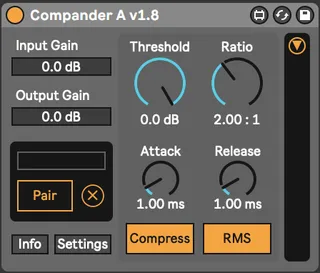
Compander A is the first device in a pair of two compander devices. Compander A compresses or expands the sound, and Compander B inverts that effect to restore the original signal. In between the two you can put a non-linear effect(s) like a distortion. The Companders allow you to shape how that effect behaves by shaping the input dynamics, which recreating the original dynamics on the other end. For example, you can heavily distort a drum bus and then restore the transients afterward.
IMPORTANT SETUP INFO:
To pair the two devices, click the "Pair" button on Compander A, then click the knob on Compander B. Many pairs of Compander devices can coexist in a Live set. It is also important that you compensate for the latency of all FX placed between the two devices. Select the FX between Compander A and B to find how much latency they are introducing. Type this amount (in samples) into the Latency Compensation box on Compander B.
A word on how this works:
I haven't seen any other devices like this in Max for Live. I think that's because passing audio rate information between devices is not straightforwardly possible. I worked around this by sending that information through Live's modulation system. This is not perfectly precise, and sometimes it introduces artifacts. For the cleanest results, use RMS mode and/or longer attack and release times, and be sure to compensate for latency correctly. You can absolutely push these settings harder, but you might run into some nasty crunching! Either way, I think the imprecision is worth it to have a totally flexible and open-ended compander which you can put on either side of any FX you want!
Comments (1)