- Type
- Audio Effect
- Author
- karhakonhronon
- Version
- 1.0
- License
- AttributionNonCommercialShareAlike
- Live version
- 11.3.10
- Max version
- 8.5.3
- Downloads
- 416
- Updated
- 2025-05-18
Node Mapper is an Audio Effect for Ableton Live by karhakonhronon, distributed as Creative Commons Attribution-NonCommercial-ShareAlike. It targets Live 11.3.10 and Max 8.5.3. On maxforlive.com it has 416 downloads. First published 2023-09-23, last updated 2025-05-18.
New to Max for Live? Read what Audio Effects do, what the AttributionNonCommercialShareAlike license means, how to install a device.
Description
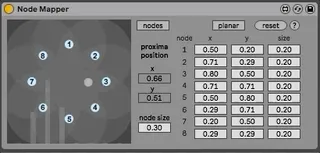
Node Mapper is a relational way of controlling mapped parameters inspired by the Surround Panner, E4L Source Panner, AmbiPanner and Vbap Doppler Panner devices. Instead of routing audio, Node Mapper routes control signals within Ableton to up to 8 parameters according to the proxima's relative position to the corresponding node.
The proxima can be positioned in three ways; using the mouse, planarly using x/y coordinates, or polarly using azimuth/distance values.
The nodes can be moved using the mouse, in the nodes panel using x/y coordinates or azimuth/distance positioning.
The size of the nodes can be adjusted together using node size, individually using the nodes panel or by option-clicking on the node and dragging the mouse. When a node's size is set to zero, no control will be sent.
When the proxima approaches a node, a corresponding bar with appear to show the value of the control signal the proxima is generating.
The Reset button will reset all the number boxes to default values except the scaling min and max for mapping.