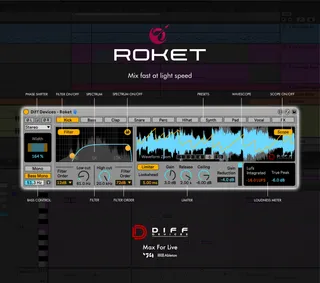
DIFF Devices - Roket
Roket is a groundbreaking utility tool that revolutionizes y...
- Type
- Audio Effect
- Author
- DiffDevices
- Version
- 1.5
- License
- Commercial
- Live version
- 11.3.10
- Max version
- 8.1.5
- Downloads
- 0
- Updated
- 2024-05-17
DIFF Devices - Roket is an Audio Effect for Ableton Live by DiffDevices, distributed as a commercial (paid) device. It targets Live 11.3.10 and Max 8.1.5. First published 2023-09-19, last updated 2024-05-17. 1 user comment below.
New to Max for Live? Read what Audio Effects do, what the Commercial license means, how to install a device.
Description
Roket is a groundbreaking utility tool that revolutionizes your track mixing experience like never before. With its intelligent track preset selection, Roket effortlessly ensures optimal volume balancing, regardless of the source sound. Additionally, it boasts a high-precision filter with a staggering 96dB per octave cutoff, empowering you to achieve pinpoint accuracy in your audio adjustments.
FEATURES 1.5:
•Bug Fixes
FEATURES 1.0:
• Automatic Mixing (choosing presets)
• Phase shifter • Stereo Width
• Bass Mono On/Off
• Bass Mono Frequency
• Lowpass and Highpass Filter (from 12db to 96dB per Octave on both filters)
• True Peak Limiter • Gain, Lookahead, Release, Saturation and Ceiling Controls
• Loudness Metering Display (LUFS, True Peak) • Wavescope • Wavescope Zoom • Factory presets for the most used types of tracks (kick, bass, etc) • GUI match Ableton Live Themes
Inside the zip file you have an file :
1. DIFF Devices - Roket.amxd
2. Save the .amxd file anywhere on your computer or in a folder that you previously saved your maxforlive devices.
3. Drag and drop the device into a midi track.
4. Click on save (on the right hand side of the window: with a 'floppy disk' icon)... (Check Manual.)
5. This will automatically save the device to your ‘User Library’ folder in ‘Places’ (the ‘head outline’ icon), and will also save a '.adv' file which can be used to store your favourite initial setup.
6. You’re good to go.
SYSTEM REQUIREMENTS • MAC & WIN * Only works in Ableton Live with Max installed. * It Requires Ableton Live V11 (minimum). * M1 Mac Compatible.
Comments (1)