Singing Bowl
Singing Bowl is an additive Synthesis Max For Live Plug-in s...
- Type
- Instrument
- Author
- Interspectral
- Version
- 1.0
- License
- None
- Live version
- 11
- Max version
- 8
- Downloads
- 0
- Updated
- 2023-10-30
Singing Bowl is an Instrument for Ableton Live by Interspectral, distributed as freeware, with no license specified by the author. It targets Live 11 and Max 8. Published 2023-10-30. 4 user comments below.
New to Max for Live? Read what Instruments do, how device licenses work, how to install a device.
Description
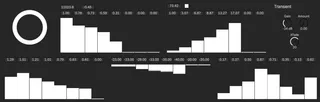
Singing Bowl is an additive Synthesis Max For Live Plug-in suitable for synthesizing singing bowl sounds. There are, at max, eight sine waves; each one’s duration, ratio to fundamental frequency, detune frequency, detune amount, and level can be independently controlled. There’s also a transient section that contains the hardness and level of the transient. MIDI signals, or the big button on the top right, can trigger the sounds.
*the transient part is somehow not working as intended, I'm trying to fix it.
Comments (4)
This is on Live 10 Suite
and several saying "poly~: patchcord inlet out of range: deleting patchcord"