Articulate
Check out this video for a detailed walkthrough: https://you...
- Type
- MIDI Effect
- Author
- graphicnoise
- Version
- 1.1
- License
- Commercial
- Live version
- 11.3.4
- Max version
- 8.1.5
- Downloads
- 0
- Updated
- 2024-11-19
Articulate is a MIDI Effect for Ableton Live by graphicnoise, distributed as a commercial (paid) device. It targets Live 11.3.4 and Max 8.1.5. First published 2023-11-08, last updated 2024-11-19. 1 user comment below.
New to Max for Live? Read what MIDI Effects do, what the Commercial license means, how to install a device.
Description
Check out this video for a detailed walkthrough: https://youtu.be/roFXrice0zI
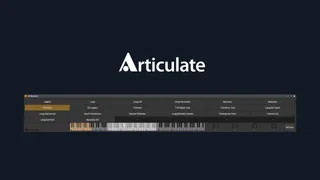
Articulate is a Max for Live device that gives Ableton Live users access to articulation keyswitches in the device view, providing a much-needed feature when composing music with orchestral libraries.
As setting up keyswitches in any DAW can be a quite time-consuming task to do, Articulate puts an emphasis on making that very process as simple and fast as possible, so you spend less time on dealing with settings and instead can focus on composing.
Articulations are displayed as buttons that allow for quick on-screen access and can be recorded straight into your tracks' automation lanes for easy editing.
In addition to keyswitches, Articulate also features a keyboard display. It not only displays keyswitches and key ranges, but also serves as one of the input methods in the settings, making for a very intuitive flow.
To round this off, four configurable CC dials can be used and automated to control specific settings in your library, which can come in handy for controlling mic mixes or things like the "Tight" setting in Audio Imperia libraries for example.
Features
- 36 configurable MIDI note keyswitches
- 6 configurable key ranges to see which notes can be played by your instrument
- 4 configurable and assignable CC dials
- Recordable buttons to keep you in the flow
- Keyswitch and CC automations are recorded and can be edited via automation lanes or overdubbing
- Keyboard view to display keyswitches and ranges and serve as quick input when setting things up
- Superfast setup workflow to let you focus on making music
- About 50-70 MB memory footprint per instance
- Scales with Ableton Live's UI scaling
- Integrates into Ableton Live's color schemes
To make setting things up even faster please take a look at a growing selection of available presets!
Comments (1)
If you are looking for something like Logic's Articulation Set Editor or Cubase's Expression Map, this may very well be it!
I really like how streamlined Articulate is (compared to some other approaches I've seen), the timesaving features that cut down on repetitive processes, and how it's expressly built for speed. The "so you can focus on composing" has been true thus far, and I'm excited for how this will hold up longer-term as Articulate is improved even more.
The MIDI learn for keyswitches is helpful for stumbling around less with "Which octave was that on? C0... C1?!" And the auto-fill range when you've typed in articulation names is neat too.
KEEP IT UP!