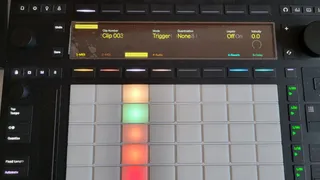
Clip Settings for Push 3 Standalone
Gives you access to: Launch Mode. Legato Mode. Clip Quantiza...
- Type
- Audio Effect
- Author
- DiscreteDevices
- Version
- 1.0
- License
- None
- Live version
- 11.3.10
- Max version
- 8.5.6
- Downloads
- 0
- Updated
- 2023-11-12
Clip Settings for Push 3 Standalone is an Audio Effect for Ableton Live by DiscreteDevices, distributed as freeware, with no license specified by the author. It targets Live 11.3.10 and Max 8.5.6. Published 2023-11-12. 2 user comments below.
New to Max for Live? Read what Audio Effects do, how device licenses work, how to install a device.
Description
Gives you access to: Launch Mode. Legato Mode. Clip Quantization. Velocity Amount.
Why do I want this?
Because these settings are currently (Push 1.1.3) not available on Push 3 in Standalone mode.
How to use the device to change Clip Launch settings
Drop the device on each track you want to edit the Clip Launch Settings. It works on both Midi and Audio tracks. For ease of use the device only affects clips on the same track. Add the device to your default Set to include it with each new set.
Select a clip in any of three ways
by hitting a pad or
by select-hitting a pad or
by using Encoders 1 + 2 (named 10 and 01)
Change the settings. Any changes are immediately effective.
Comments (2)
So nice one comrade, I'm gonna have a rest instead :-)
Thx!
If grabbing controls on P3 wasn't buggy we would even be able to implement a device that controls the currently selected clip, so that we'd only need one instance on e.g the Master rather than one per track.
Quick question: I'm currently looking for a way to change the Program Change settings per clip directly from Push Standalone. Any chance / possibility for you to add this to the device?