- Type
- MIDI Effect
- Author
- halfman73
- Version
- 1.0
- License
- None
- Live version
- 11.3.11
- Max version
- 8.5.6
- Downloads
- 555
- Updated
- No Updates
Grids 4 Push is a MIDI Effect for Ableton Live by halfman73, distributed as freeware, with no license specified by the author. It targets Live 11.3.11 and Max 8.5.6. On maxforlive.com it has 555 downloads. Published 2023-11-30. 8 user comments below.
New to Max for Live? Read what MIDI Effects do, how device licenses work, how to install a device.
Description
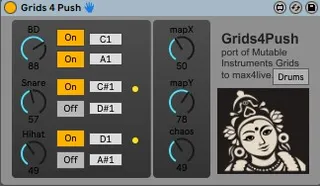
A simple update of the wonderful Grids for Max device to include Push mapping.
Original device shown below: -
https://maxforlive.com/library/device/2518/grids-for-max-for-live
Tested on Push 2 & Windows only.
License : released under GPL 3.0
Comments (8)
if this version is just some mappings/properties added to the knobs (i have no idea how it works), happy to integrate it in the main device if it helps.
That's pretty much it. Just add a bank object, map the items you want to show on the Push and then adjust the text to show whatever you like. So straightforward even I managed it :)
I hope you wont mind, i updated my device to support Push as well. thanks a bunch for doing the initial work on it :) I took the liberty to change the banks a little bit (Grids, Euclidiean, Notes, Outputs).
@Thoow: Push 3 standalone does not support custom externals at the moment, so it's not possible. that might change, who knows :)
i use it on a drum rack and play Santoor for jam mixed with an arp from Jupiter , so much fun
and superb device ,
Just one lil issue , when I close the set after saving it and reopen it I see all lights lighting up and drums loaded but no sound output ,
till I remove and reinsert Grids.
I couldn't understand why it would happen ??
If I use voct.grid M4L , this doesn't happen ,
but I like your knob assignments for midi mapping more :)
On mac os , Ableton 11 , m4l - 8.6.0,
Cheers
Any suggestions !?
compatible with Apple Silicon. Consider running
Live under Rosetta." - On a M1 Mac with ableton 11.2.7 Does anyone know of a fix?