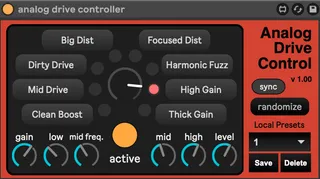
Analog Drive Control
Analog Drive Control is a MIDI controller for the Elektron A...
- Type
- MIDI Effect
- Author
- alteredSignal
- Version
- 1.0
- License
- AttributionNonCommercialShareAlike
- Live version
- 12.0.2
- Max version
- 8.6.0
- Downloads
- 153
- Updated
- 2024-04-24
Analog Drive Control is a MIDI Effect for Ableton Live by alteredSignal, distributed as Creative Commons Attribution-NonCommercial-ShareAlike. It targets Live 12.0.2 and Max 8.6.0. On maxforlive.com it has 153 downloads. Published 2024-04-24.
New to Max for Live? Read what MIDI Effects do, what the AttributionNonCommercialShareAlike license means, how to install a device.
Description
Analog Drive Control is a MIDI controller for the Elektron Analog Drive multi-circuit distortion pedal. This plugin enables easy access and saving of all of the pedal's parameters, as well as live knob adjustment via Ableton's automation lanes and modulator devices (e.g., LFO, envelope follower, etc.).
If you find the plugin useful, please consider donating a coffee at ko-fi.com/alteredsignal
Tested working on Ableton Live 11 and 12.
To use, drop the Analog Drive Control device into a new MIDI track in Ableton. Set the track's MIDI channel to match that of the input channel of the Analog Drive pedal (see page 15 of the Analog Drive manual to set the input MIDI channel). Connect a MIDI cable to the input of the Analog Drive and to the MIDI output of your audio interface. Test the connection by adjusting the Circuit Selector knob on the plugin - the corresponding LED should light up on the pedal. Happy tweaking!