SimulScrub5
SimulScrub is a Max for Live device that plays a number of c...
- Type
- Instrument
- Author
- zsteinkamp
- License
- AttributionNonCommercialShareAlike
- Live version
- 12.0.2
- Max version
- 8.6.0
- Downloads
- 0
- Updated
- 2024-12-14
SimulScrub5 is an Instrument for Ableton Live by zsteinkamp, distributed as Creative Commons Attribution-NonCommercial-ShareAlike. It targets Live 12.0.2 and Max 8.6.0. First published 2024-05-01, last updated 2024-12-14. 11 user comments below.
New to Max for Live? Read what Instruments do, what the AttributionNonCommercialShareAlike license means, how to install a device.
Description
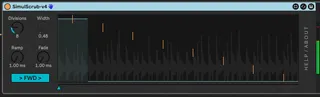
SimulScrub is a Max for Live device that plays a number of contiguous time segments of an audio file simultaneously, with a flexible crossfader control to select which segment(s) you want to hear.
This allows you to scrub through time of a longer sample, while always playing the sample at 1x speed. 🤯
In the screen capture shown, the yellow lines represent virtual "playheads" playing from your sample at that position. The blue bars coming in from the bottom represent the volume that the respective playhead will actually play. The position is controlled via slider below the main display, with control over the width of the pickup pattern.
Just drag an audio sample or file to the main plugin area and play any MIDI note to start playing. Automate or modulate the Position slider and Width knob. See how different numbers of slices (up to 32) changes things.
v4 Fixes pops and clicks bugs as well as adding controls for speed and fade times.
If you'd like to see a demonstration in the context of a track:
https://www.youtube.com/watch?v=zng2J0UxUZA
Comments (11)
I've got a couple little explainers/demos here:
https://www.youtube.com/watch?v=cmFD9lj6tl4
(older version)
https://www.youtube.com/watch?v=574H1rq7Tkg
Similar concept, but for group tracks, instrument racks, and fx racks.
https://maxforlive.com/library/device/9941/chiastic-slide
(The link I posted in the comment from May 01 above was unintentionally truncated, so this is the full one.)
I'm not getting the blue bars in the window [the pyramid] :(
Also, it's popping each time the sample / a segment restarts.
Also, am I right in thinking all notes on a midi keyboard serve to just trigger this thing to play, and all functionality is within the plugin itself?
Really loving it. Thanks for sharing. :)
Feel free to send details (screenshots, descriptions, etc) or even a whole Live Set to me to try to figure out why you're not getting the blue bars.
https://github.com/zsteinkamp/m4l-SimulScrub/releases/download/v4/SimulScrub-v4.amxd
Also one showcasing it with the Amen Break: https://www.youtube.com/watch?v=LjSMfL88lOk