Menu Folder for Max
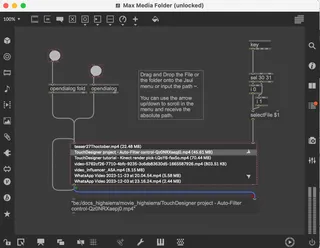
This Jsui script allows you to navigate a selected folder me...
- Type
- MIDI Effect
- Author
- OSTINSOLO
- Version
- 1.0
- License
- None
- Live version
- 10.1.18
- Max version
- 8.1.5
- Downloads
- 0
- Updated
- 2024-05-03
Menu Folder for Max is a MIDI Effect for Ableton Live by OSTINSOLO, distributed as freeware, with no license specified by the author. It targets Live 10.1.18 and Max 8.1.5. First published 2024-05-01, last updated 2024-05-03. 2 user comments below.
New to Max for Live? Read what MIDI Effects do, how device licenses work, how to install a device.
Description
This Jsui script allows you to navigate a selected folder media, with a an expanded view of the files and relative byte size.
Drag and Drop the File or a folder onto the Jsui menu or input the path ~, there are two opendialog that will help with the browsing.
You can use the keyboard arrow up/down to scroll in the menu and receive the absolute path.
I use it as part of a process chain of two major projects and have extra control over my files system.
Comments (2)
Audio buffer replacement: can be used to iterate over audio files, facilitating seamless buffer replacement in audio processing tasks.
Video playlists: By integrating the JSUI files with a jit object, you can generate dynamic playlists of videos, enhancing media playback experiences.
Mixed format media retrieval: it efficiently filters and retrieves media files from folders containing mixed format files, simplifying media organization and access.
File version checking: Comparing file sizes, it enables you to identify different versions of similarly named files, aiding in file version control and management.
These are just a few examples of how this object can be utilized. Its flexibility and functionality make it a valuable tool for a wide range of media-related tasks, offering developers and users a convenient way to interact with and manage media files within a system folder.