Preset Enhanced
Preset Enhanced – Seamless Preset Saving for Max for Live ...
- Type
- Audio Effect
- Author
- OSTINSOLO
- Version
- 1.0
- License
- Attribution
- Live version
- 12.0.5
- Max version
- 8.6.2
- Downloads
- 148
- Updated
- 2025-06-13
Preset Enhanced is an Audio Effect for Ableton Live by OSTINSOLO, distributed as Creative Commons Attribution. It targets Live 12.0.5 and Max 8.6.2. On maxforlive.com it has 148 downloads. Published 2025-06-13. 6 user comments below.
New to Max for Live? Read what Audio Effects do, what the Attribution license means, how to install a device.
Description
Preset Enhanced – Seamless Preset Saving for Max for Live Devices
Are you a Max for Live developer frustrated by the lack of native preset saving between Ableton Live sessions?
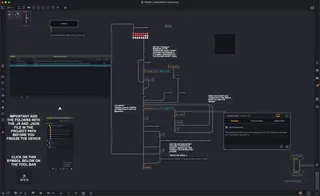
Preset Enhanced is here to bridge that gap! This device demonstrates a practical and reliable method for saving and restoring device presets across sessions, something the Ableton community has been waiting for.
Why check out Preset Enhanced?
Solves a missing feature: Native preset saving between sessions is not yet available in Ableton Live. This device shows you how to implement it yourself.
Easy integration: The included script is straightforward to adapt for your own Max for Live devices.
Empower your users: Let your users back up, transfer, and restore their device states with ease.
Open for collaboration: If you use or adapt this method, please cite me (Ostin Solo) and don't hesitate to get in touch!
I’m always interested in collaborating or featuring your work on the VSTOPIA website.
Explore the code, implement this feature in your own devices, and help push the Max for Live ecosystem forward.
Contact & Credits:
Ostin Solo, VSTOPIA
Web: vstopia.com ---- ostinsolo.co.uk
GitHub: https://github.com/VSTOPIA ---- https://github.com/ostinsolo
Comments (6)
Thank you !
Normally, when a Max for Live device is frozen and distributed, Ableton opens it in a temporary folder at runtime. That means any presets saved during the session are lost when Ableton closes, unless they are manually exported.
Because of this, users often end up saving different instances of the same device (with different settings) just to preserve their presets, which can quickly become messy and confusing in the browser.
This patch was made to solve that issue by providing a more persistent and user-friendly way to store presets across sessions, without needing to save multiple versions of the device.
With this device, storing a preset is as simple as shift-clicking; no need to navigate folders or select files. When you reload the device, your preset will be right there, ready to go.
I will soon provide an extension of my example to use a XML file format and writexml and writejson.
That said, if you’ve found an alternative way to achieve the same result, feel free to share it here, I’d genuinely be curious to see your approach.