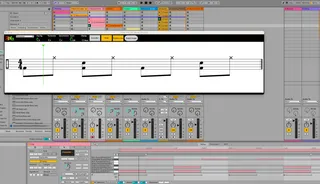
FPB Clip to Score
Clip to Score Version 0.6.7 Clip to Score makes insta...
- Type
- MIDI Effect
- Author
- fingerspushbuttons
- Version
- 0.6.7
- License
- Attribution
- Live version
- 12
- Max version
- 8.1.5
- Downloads
- 0
- Updated
- 2024-07-11
FPB Clip to Score is a MIDI Effect for Ableton Live by fingerspushbuttons, distributed as Creative Commons Attribution. It targets Live 12 and Max 8.1.5. First published 2024-06-10, last updated 2024-07-11.
New to Max for Live? Read what MIDI Effects do, what the Attribution license means, how to install a device.
Description
Clip to Score Version 0.6.7
Clip to Score makes instant musical score from clips in Ableton Live
This is a pretty major update from version 0.5
FPB Clip To Score Requires MAX 8, and Bach Package Externals and is Made with Ableton Live 12.
-I intend to keep this device freely available but do really rely on donations and people spreading the word about my devices, if you can't't do one please do the other. Many thanks. FPB-
Feature : Completed : Achievable
New Features in this version 0.6.7
Drum Kit Score : YES*
Automatic clef selection : YES
Multiple voices as separate staves in a single display: YES
Synchronised playback display with the clip in the live set : YES
Fixed Bar/measure length display: YES
Vertical Zoom control: YES
Play Back Position Marker: YES
Adaptive score window sizing: YES
Basic image export: YES
Existing Features
Instantly display any session view MIDI clip as musical score : YES
Show empty bars/measures at the end of a clip: YES *
Multiple Key Sigs on a single dial : YES
Always Floating Window : YES
Instant representation of edited MIDI notes : YES
Displays Live input when recording: YES
Updates with Lives native MIDI modulators : YES
Edit time numerator and denominator : YES
Multiple clefs including Rhythm options : YES
Simple single line rhythm display: YES
Numbered bars: YES
I Set the display with the loop braces: YES *
*working on improved implementation of this feature.
Lock to this clip button: NO: YES
Lock to this track button : NO: YES
Bb and other non C standard transpositions : NO: YES
Automatic Key Sigs : NO: YES
Scale spelling implementation : NO: YES
Edit clip notes from score : NO: YES
Random note generation from the device : NO: YES
Chord Name functions: NO: YES
Quick tidy functions from the device (eg quantise and legato) : NO: YES**
Arrangement View mode: NO: YES
**Can easily achieve same outcome with Live 12 MIDI Transformers
MPE support : NO: NOT SURE
Multiple key sigs per clip : NO: NO
Multiple time sigs per clip : NO: NO
Guitar Tablature mode NO: NO...actually yes I think it it is possible.
Known issues and bugs
Group track and drum displays take a few seconds to load. This is to prevent crashes due to an order issue within the max for live that should be fixable in a future update.
Empty bars at the end of a clip briefly display at the wrong length when editing clips. This is an order issue within the max for live device that should be fixable in a future update.
Wondering accidentals. Very rarely accidentals have been witnessed moving in group track scores. The cause is unknown if you experience this please report the circumstances so we can identify the cause and fix the bug.
Sometimes the play line only moves in bar/measure increments after loading. This is a self righting issue once the clip focus is changed. It is probably caused by an order issue inside the max for live device when loading and will be addressed in a future update.