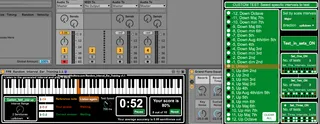
FPB Random Interval Ear Training
Random Interval Ear Training is a Max for Live MIDI device d...
- Type
- MIDI Effect
- Author
- fingerspushbuttons
- Version
- 1.1
- License
- AttributionNonCommercialShareAlike
- Live version
- 10.0.1
- Max version
- 8.0
- Downloads
- 476
- Updated
- 2018-07-30
FPB Random Interval Ear Training is a MIDI Effect for Ableton Live by fingerspushbuttons, distributed as Creative Commons Attribution-NonCommercial-ShareAlike. It targets Live 10.0.1 and Max 8.0. On maxforlive.com it has 476 downloads. First published 2018-07-23, last updated 2018-07-30. 4 user comments below.
New to Max for Live? Read what MIDI Effects do, what the AttributionNonCommercialShareAlike license means, how to install a device.
Description
Random Interval Ear Training is a Max for Live MIDI device designed to test and improve aural intonation.
Place this device behind any MIDI instrument and play or click in a reference note. The device will randomly generate another note up to an octave / 12 semitones away and you have to play back that same note to score a point.
Repeat until ready to stop, following the instructions in the top left corner of the device.
Includes a timer and points tally for your enjoyment / reference.
v1.01 mouse click notes are now always velocity 100
v1.02 added average accuracy and minor display changes.
v1.1 Added a pop up for more advanced test settings. You can now select specific intervals to test or set intervals by scale, set a test routine and control the test speed. Alternatively use it just as you did.
bug: sometimes having to press reset to start the device after loading
Comments (4)
- locking the reference note, so we don't have to replay it all the time
- setting the speed at which the new notes are triggered once a new reference note is assigned/ or the last note was guessed correctly
That would be awesome!
I have been making a few updates including allowing for various customisations of the test including setting 'in scale' intervals only and setting test speed...speed of the interval to play that is as you have requested.
However at this time for my purposes I feel it is important to play the interval as well as hear it so I am leaving in the played reference note. Its also a very simple way for the user to control the test pitch centre and pace.
the new version will be up very soon, let me know what you think.