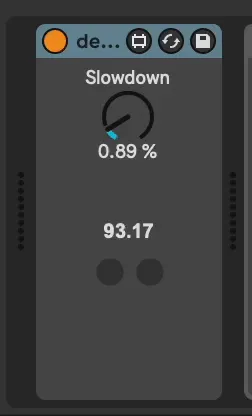
decalage
decalage is a MIDI effect to slow down incoming MIDI events....
- Type
- MIDI Effect
- Author
- lucijan
- Version
- 0.1
- License
- None
- Live version
- 11
- Max version
- 8.6.2
- Downloads
- 90
- Updated
- 2024-06-24
decalage is a MIDI Effect for Ableton Live by lucijan, distributed as freeware, with no license specified by the author. It targets Live 11 and Max 8.6.2. On maxforlive.com it has 90 downloads. First published 2024-06-19, last updated 2024-06-24. 3 user comments below.
New to Max for Live? Read what MIDI Effects do, how device licenses work, how to install a device.
Description
decalage is a MIDI effect to slow down incoming MIDI events. It emphasizes fractional slowdowns (in the range of 0% - 1%) to produce phasing effects.
***
Drop decalage into the device chain of a MIDI track and adjust the slowdown. The resulting tempo in BPM is shown below slowdown control. Pressing [play] in Ableton will restart the effect independent of the current position in the project. In other words when pressing play the slowed down track is synchronized with the project. While playing it will increasingly go out of sync. This is done to facilitate working on phrases in the arrangement view. Under the hood decalage is just a linearly increasing delay so it is not suited for live playing.
Comments (3)