- Type
- MIDI Effect
- Author
- chapelierfou
- Version
- 1.11
- License
- AttributionShareAlike
- Live version
- 12.0.5
- Max version
- 9.0.1
- Downloads
- 271
- Updated
- 2026-05-01
Archiduc is a MIDI Effect for Ableton Live by chapelierfou, distributed as Creative Commons Attribution-ShareAlike. It targets Live 12.0.5 and Max 9.0.1. On maxforlive.com it has 271 downloads. First published 2024-06-18, last updated 2026-05-01. 6 user comments below.
New to Max for Live? Read what MIDI Effects do, what the AttributionShareAlike license means, how to install a device.
Description
This is my new free M4L device, "Archiduc".
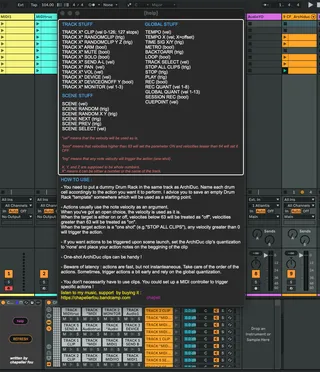
It allows you to trigger various actions in your Ableton Live Set from a single MIDI track, using MIDI notes sent to a Drum Rack which chains are named accordingly to the actions.
VIDEO PRESENTATION HERE : https://www.youtube.com/watch?v=hqaDSmPzz-U
UPDATE 20260501 :
Added the next scene buttons + OVR on the main interface + a setting to protect from potential double triggering.
UPDATE 20250904 :
Total rewrite of the internals :
- FIX : simultaneous actions would not work properly
- IMPROVEMENT : TRACK actions can be now be called by track names, which is quite a game changer as you can now reorder tracks without breaking the actions (just hit "refresh" after moving tracks)
- ADDED : TRACK X DEVICE : selects devices
- ADDED : TRACK X DEVICEONOFF Y : enables/disables a specific device
UPDATE 20250630 :
Addition of
TRACK X RANDOMCLIP
TRACK X RANDOMCLIP X Y
CUEPOINT
Comments (6)
Ouch....You've discovered a nasty bug/issue. There is indeed a problem with simultaneous messages. I have a very good idea about what's causing this, but solving the issue might or might not be easy.
I'll have a look into it as soon as possible, it's on top of my list. I hope to come with a fix soon.
Meanwhile, I would stop using the device, or at least avoid simultaneous messages (A small delay, like 50ms, between events should be enough).
I sincerely deeply apologize for the inconvenience.
Fixed, + added new functions, + access tracks by name !
If the device makes you happy, I'm happy ! I had to recode the whole thing when you made me discover my mistake, but I'm glad you did.
Also, yes, for randomclip, Y and Z is the range of clips.
For the "offset" of tempo function, it's simply any number that would be added to the velocity of the trigger note. Usually I would use 100 but it's up to you.
I'd be curious to discuss the way you use it, but unfortunately there's no PMs here. Maybe reach me through Ableton's forum ?