- Type
- Audio Effect
- Author
- bhenry1790
- Version
- 1.0
- License
- None
- Live version
- 12.0.5
- Max version
- 8.6.2
- Downloads
- 93
- Updated
- No Updates
ESX8CV Helper Mac is an Audio Effect for Ableton Live by bhenry1790, distributed as freeware, with no license specified by the author. It targets Live 12.0.5 and Max 8.6.2. On maxforlive.com it has 93 downloads. Published 2024-06-28. 1 user comment below.
New to Max for Live? Read what Audio Effects do, how device licenses work, how to install a device.
Description
Finally Apple Silicon compatible!
This utility requires Expert Sleepers ES-5 and ESX-8CV expanders
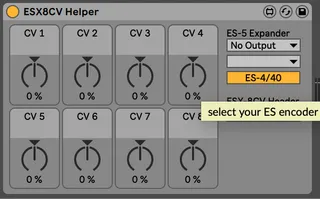
8 knobs driving 8 outputs of the ESX-8CV. I like to map the MIDI LFO / Envelope to the knobs and let it rip!
Set the ES-5 Expander Ext. Out to the stereo pair of your ES-5, then set the ESX-8CV Header to the one connected to the EXS-8CV.
Updated to work with Push Banks
You'll need to add the es*encoder~ externals to Max for these to work.
https://www.expert-sleepers.co.uk/downloads.html
Mac location for externals:
Users/Shared/Max 8/Library/
If using with an ES8/9 as an aggregate device turn off DRIFT CORRECTION
Comments (1)
Would some of your M4L devices capable of operating/controlling the ESX-8MD (MIDI+Sync)? My goal is to sequence vintage Roland samplers from Ableton Live (12) through the ESX-8MD. (I’m also using a MacBook Pro with a MOTU UL MK5).
I have the ES-10 (ADAT IN/OUT from/to the MOTU), ES-5, ESX-8CV, ESX-8GT, and of course the ESX-8MD, all connected together (expanders connected to the ES-5 headers 2, 3 and 4 respectively).
I’m wondering if the ES Silent Way plugin will be 100% necessary to use the ESX-8MD the way I intend to use it for?
Thank you very much for your help and time, appreciated!