MultiDevicePresetMidi
This is a preset device (modified DevicePreseter patch) that...
- Type
- MIDI Effect
- Author
- Trypta
- Version
- 1.2
- License
- None
- Live version
- 8.2.8
- Max version
- 5.1.8
- Downloads
- 1,591
- Updated
- 2012-03-01
MultiDevicePresetMidi is a MIDI Effect for Ableton Live by Trypta, distributed as freeware, with no license specified by the author. It targets Live 8.2.8 and Max 5.1.8. On maxforlive.com it has 1,591 downloads. First published 2012-02-26, last updated 2012-03-01. 6 user comments below.
New to Max for Live? Read what MIDI Effects do, how device licenses work, how to install a device.
Description
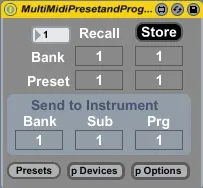
This is a preset device (modified DevicePreseter patch) that can store the parameter values of up to 5 devices and send a program change to an instrument. Basically it allows a person to save an entire channel strip and change it with a program change.
Place the device before an instrument on a midi track, open "p Devices" window to select the devices you want to control, choose the bank, sub bank and program change you want to send to the instrument. Then select the bank and preset value you want store your preset to and press store to save the preset.
You can then send a bank and a program change from a midi clip to change the preset selected. It can now save up to a 128 banks of a 128 presets each.
cheers
Keith
edit: fixed outputting multiple program/bank changes when changing presets
Comments (6)
Found some minor troubles, so if You're into getting info on that - let me know.
cheers
Keith
+ i missed a guideline - even a few words would help as it took me some time to find out what is all about.
+ after pushing the "Presets" button at first shows up "Storage Slots" which purpose I don't get, and behind it there is the Storage Slots window
+ the pDevices and pOptions buttons need double mouse click
+ in pOptions window "save" and clear don't close after clicking ok, didn't try other options.
+ "save" option doesn't respond to cancel and sometimes even saving returns the browser window
+ don't get the " Send to Instrument" section (the blue one) as chosing bank/preset from above works fine for managing the presets
+ in automation section of clip view the device doesn't show up, I've found the way to around this problem by setting the device into midirack and mapping bank/preset numbers to macros - works fine, but if You adjust macro knob to fast the device loses control and You may end for instance with macro knob on 128 while the bank/preset number is set to 110, which doesn't matter when You want it just to set those in the clip.
Additional ideas:
+ it would be just great to have an option to name each preset and bank, like: bank #1 bass drums, bank #2 pad and so on.
+ is it possible to have a midi mapping saved inside the presets as well?
Beside these the device seems just brilliant especially the save option and I'm considering puting it into my default instrument rack package as native ableton plugs lack of the preset management.
I'll keep checking this machine and if You're interested in my opinions on it I'll be happy to help You in development (unfortunatelly I'm able to do it only as a end user at the momment though).
rspct.
v
Ableton Live 8.3.4
Max 5.1.9
MacOSX 10.8.2
I'm quite busy these days so I probably won't get to it for a bit. Some of the things your mentioning (such as the cancel button isn't working) I think are actual M4L bugs that I wouldn't be able to fix but I'll check it all out anyways.
I think it would be nice to be able to name presets also but the object (pattrstorage) that stores them uses numbers for saving/recalling presets and I would have to set up a whole new level with a coll object that saves a list pf names that would then correspond to each number which at this moment I probably don't have time to do. I'll check it out though and see what I can do for you.
cheers
Keith
Wesh