- Type
- MIDI Effect
- Author
- JuanSOLO
- Version
- 1.0
- License
- None
- Live version
- 8.2.8
- Max version
- 5.1.8
- Downloads
- 889
- Updated
- 2012-03-03
remoteNOTE is a MIDI Effect for Ableton Live by JuanSOLO, distributed as freeware, with no license specified by the author. It targets Live 8.2.8 and Max 5.1.8. On maxforlive.com it has 889 downloads. Published 2012-03-03. 3 user comments below.
New to Max for Live? Read what MIDI Effects do, how device licenses work, how to install a device.
Description
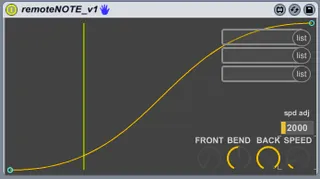
Incoming midi notes trigger a curve over time, and controls a devices parameter. I built this as an alternative to sidechaining kicks. However I realized it was more versatile than that.
INSTRUCTIONS
1. Insert 'remoteNOTE' as a midi effect any where thats receiving notes.
2. Every time a note is played, the curve gets triggered left to right.
FRONT- sets the height of the starting point
BEND- inverts curve
SPEED- sets the amount of time it takes to pass (when all the way down, the speed is VERY fast)
spd adj- when increased, the SPEED knob is adjusted to span over longer times.
3. set your menus to select the parameter you want to modulate.
As I said above, I built this for sidechaining the kick. I put this device as the first device in my kick drum cell, I attach it to a macro that is mapped to a utility device's gain, that resides on my synth track. After testing it and making adjustments, I realized I could set it all kinds of ways and control any parameter I wanted. ALSO I dont have to trigger it with drums, I can trigger it with any thing sending midi notes.
Right now it's a very simple device and I like that. However any ideas on making it better are welcome.
Comments (3)
I only have one thing that I think would make this perfect. A Min and Max setting would be really great. I only say this because when I use this with an audio track and map it to a Utility it cranks the volume up to 35, so crazy red goin on. I have pulled the Back setting way down but it feels a little touchy. Please let me know if you ever release a v2. I will be using this a lot I think so keep in touch.
Thanks again!