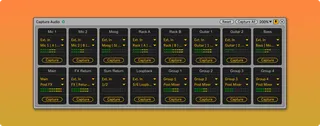
Capture Audio
Capture audio and insert it into the project with a single c...
- Type
- Audio Effect
- Author
- killihu
- Version
- 1.0
- License
- Commercial
- Live version
- 12.1
- Max version
- 8.6.4
- Downloads
- 0
- Updated
- 2024-12-27
Capture Audio is an Audio Effect for Ableton Live by killihu, distributed as a commercial (paid) device. It targets Live 12.1 and Max 8.6.4. First published 2024-11-01, last updated 2024-12-27.
New to Max for Live? Read what Audio Effects do, what the Commercial license means, how to install a device.
Description
Capture audio and insert it into the project with a single click. Mimics the behavior of Live’s Capture MIDI feature but for audio inputs.
Main features:
- Capture audio from external input sources or project tracks.
- Save captured audio to disk and automatically insert it into a project track.
- Captured audio can be inserted as a Session Clip or directly into the Arrangement.
- Audio can be captured from up to 16 input sources simultaneously.
- Auto-Reset mode similar to Capture MIDI. The internal buffer is cleared every time the transport is started.
- Captured audio is saved in a custom folder or automatically inside the project folder.
- Name customization of the created audio files.
- Alternative single input version that works in the track’s effects chain.
See details and changelog at:
https://killihu.vstskins.com/capture-audio/